Experiments with ruby-processing (processing-2.2.1) and JRubyArt for processing-3.0

Showing posts with label pry. Show all posts

Thursday, 30 July 2015

Ruby-Processing now using pry for live coding mode

The latest release of ruby-processing uses pry for live coding, and this is genuinely exciting. Here is a live mode for a class wrapped jwishy.rb sketch, which I have listed in the pry console using '$' command (NB: click on images to see full size):-

This is all the class wrapping needed

class JWishy < Processing::App
  # bare sketch code
end
Bare sketches instead get listed as the super class, but to be honest listing of the code in the pry console is not that exciting see embedded video, the exciting bit is to be able to futz with sketch code from the console and watch it affect the running console (but why not try it for yourself). In the "Wishy Worm" example we change the background of the sketch by changing the @back_color variable, and change the bluish accessor method to a custom method that returns bluish as function of the y_wiggle variable

But you can do so much more, including 'ls' available methods, and remember pry has a built in help...


live from monkstone on Vimeo.

Live coding in ruby-processing now using pry

Bounce.rb code used in video
You should also checkout the pry 'edit' function, which allows you to use your favourite editor to edit a method say 'JWishy#draw'

Sunday, 26 July 2015

Yet more experiments with JRubyArt and pry

My experience of ruby-processing with pry (for live mode) has not been promising, however things change so I thought I would give it another go, since the live IRB, has not been that wonderful either:-
The live.rb code
# An pry shell for live coding.
# Will start with your sketch.

require_relative 'base'
Processing.load_and_run_sketch

ARGV.clear # So that pry doesn't try to load them as files.

require 'pry'
$app.pry

The sketch k9 create fred 300 300 --wrap
class Fred < Processing::App
  def setup
    sketch_title 'Fred'
  end

  def draw

  end

  def settings
    size 300, 300, FX2D
    # smooth # here
  end
end

k9 live fred.rb

Turns out it was a really lucky choice to experiment with FX2D sketch (as there might be threading or other issues with JAVA2D), another strategy that seemed to work well is to redefine the sketch draw loop from pry (still can't see a serious use case, but it is a bit of fun). IRB can handle a yield block in draw loop (with block_given? guard) but it doesn't play too well with pry.

Sunday, 2 February 2014

More experiments with pry and ruby processing

I have found that is is indeed possible to use pry in place of irb with JRubyArt (on the pry branch of development branch of ruby processing). The most secure way is to create and install a 'java' platform version of the JRubyArt gem, requiring pry (unless you are using bundler (or rvm?) install pry using `jruby -S gem install pry`). Below is a snapshot of a ruby-processing sketch started with:-
jruby -S k9 live drawolver # update 4 Feb 2014 (default to using installed jruby)
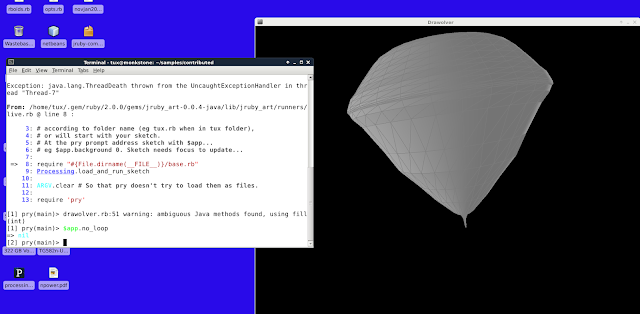
In this case I need to use `jruby -S` because for my pry-branch I specify use of java engine (on reflection I don't think this is important), however the --gem flag is important. Now using anBy using the --gem flag we require the sketch to be actually run with an installed jruby (this seems to be required to use gems, and in this case we want to use pry-java version). In the pry branch of JRubyArt I have substituted pry for irb. As with the irb live mode you can access the sketch with `$app`, see below where no_loop command has been sent (stops the draw loop).
screenshot
Running JRubyArt in live mode (note use $app to access sketch)


What good it is, is best tested by pry afficianados, however it also occured to me that there is an alternative way of introducing/using pry. If you start a sketch in the "watch" mode you can edit the live sketch to:-
require 'pry'
# and where you want the break
binding.pry
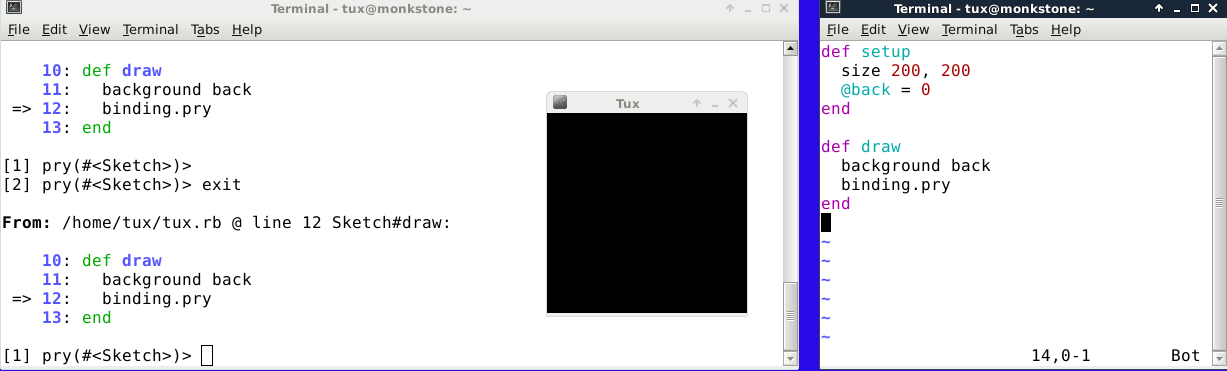
This also works but again I'm no pry afficianado, so I will leave it to them to decide how best to proceed, but in this scenario you could edit the sketch either from pry, or with an independent editor (tested with vim for both in my case). See below, here I found I was able to set the @back variable directly (no need to call $app). In this I started the sketch in the watch mode, and edited in vim (right-hand terminal, with and unusual white background for me!!)
Now this is slightly interesting, instead of continuing to type $app in the pry repl, you can assign to app `binding = $app`. Then just carry on as though you are editing a regular ruby sketch...

Friday, 27 December 2013

Experimenting with pry and JRubyArt

If we replace ruby-processings 'live.rb' with the following version, we can easily use pry with ruby-processing (but I am not sure what for, because I don't use pry).
# An PRY shell for live coding. 
# This flavor will either load up empty JRubyArt sketch, 
# or will start with your sketch.

require "#{File.dirname(__FILE__)}/base.rb"
Processing.load_and_run_sketch

ARGV.clear # So that IRB doesn't try to load them as files.

require 'pry'

binding.pry
You still need to access sketch using $app, eg $app.background 0 sets background to 0 (but I expect that could be changed?). Ideally you will also install pry with rgem, and use the --gem flag to be sure that jruby can use the pry gem. Actually turn out this is still somewhat flakey, certainly on linux.

Followers

About Me

My photo
I have developed JRubyArt and propane new versions of ruby-processing for JRuby-9.1.5.0 and processing-3.2.2