Experiments with ruby-processing (processing-2.2.1) and JRubyArt for processing-3.0

Showing posts with label vim. Show all posts

Tuesday, 26 May 2015

Alternative development environments for ruby-processing and JRubyArt

NetBeans

No really, netbeans can be used as a development environment for ruby-processing (and might be a sensible choice on windows). The first hurdle is to install the jruby netbeans plugin thereafter things get easier (you can use the plugin to install ruby-processing gem, but you will still need to install vanilla processing, unless using JRubyArt). NB you sometimes have to be a bit patient (ruby-plugin slows down the ide and loading gems etc can take a time).

JEdit

Not really an ide but comes close with the ruby-plugin (but the plugin is in serious need of an update ruby 1.86) see live editing and my jedit resources here for my macro and console plugins

Vim

An editor favoured by many ruby users (combine with tmux etc for true awesomeness). Create a sketch in vim, fire it up with rp5 watch and you have a nice replish way of working.
To simply run the sketch you are currently editing :!rp5 run % or to force use of jruby-complete :!rp5 --nojruby run %

Emacs

Some kind person could produce an Emacs major-mode for ruby-processing, like the processing-mode. Still popular...

Textmate / Sublime

Popular on the Mac see ruby-processing textmate bundle, which also could do with updating, but could get you started.

The Processing Ide

Not an option, Tyfkda did some preliminary work on a ruby-mode for processing, but is difficult.

Atom editor

Looks to be a good editor might be perfect match for ruby-processing development?....

Monday, 1 September 2014

Getting started with ruby-processing for ruby purists

Previously in my post getting started for wizards I showed how to create a sketch that would be more familiar to people coming from processing to ruby-processing. The sketch does not need to be explicitly wrapped as a class (that extends from Processing::App), since ruby-processing does that for you under the hood. This is the DSL approach to writing ruby-processing sketches which I favour, and makes it easier to read across from other processing modes to ruby-processing. However since ruby-processing-2.6.0 it is just as easy to create a classical sketch.
rp5 create classic_sketch 200 200 --wrap
rp5 watch classic_sketch.rb


Open a new console and 'vim classic_sketch.rb' or us another suitable editor

class ClassicSketch < Processing::App
  def setup
    size 200, 200
  end

  def draw

  end
end

# ClassicSketch.new(x: 20, y: 20)

For instant gratification and to relocate the sketch on your display un-comment the last line of the sketch and save (also note this line was "not" required to run the sketch, rp5 run or rp5 watch takes care of creating a new instance of sketch for you). You only use this form to send parameters, such as 'x offset' to your sketch

class ClassicSketch < Processing::App
  def setup
    size 200, 200
  end

  def draw

  end
end

ClassicSketch.new(x: 20, y: 20)
The sketch updates auto-magically...
Already in the works for the next release is the possibility of placing the sketch on your screen using the config file '~/.rp5rc' so this is kind of redundant, but a post initialization hook might get added so you will be able to send all sorts of other parameters. Which are then available by overriding the post_initialization hook method (See Sandi Metz POODR)

Next change the background of your sketch

class ClassicSketch < Processing::App
  def setup
    size 200, 200
  end

  def draw
    background 0
  end
end

ClassicSketch.new(x: 20, y: 20)

Next create a blue box.

class ClassicSketch < Processing::App
  def setup
    size 200, 200
  end

  def draw
    background 0
    fill 0, 0, 200
    rect 40, 50, 120, 100
  end
end

ClassicSketch.new(x: 20, y: 20)


To create class wrapped P3D sketch just "rp5 create classy_sketch 200 200 p3d --wrap" actually it probably doesn't matter where you put the --wrap option after create (but the order of the other variables is important)...

Sunday, 31 August 2014

Getting started with ruby-processing for wizards (best for vim users, though other editors can be used)

You have to start somewhere and for brevity I am assuming you've installed ruby-processing-2.6.2 here:-
rp5 create my_sketch 200 200
rp5 watch my_sketch.rb


In a new terminal start up vim
vim my_sketch.rb

def setup
  size 200, 200
end

def draw

end

Edit the sketch to change its background

def setup
  size 200, 200
end

def draw
  background 0
end

On saving the sketch refreshes for you

Now add a colored ellipse

def setup
  size 200, 200
end

def draw
  background 0
  fill 200, 0, 0
  ellipse 100, 100, 120, 100
end

Save the sketch again and is update once more, how cool is that!!!

Now this all easiest done using vim (I mean you only need two consoles and you are cooking, but you could do the same with emacs, jEdit, eric, textmate to name but a few decent editors). With processing-2.2.1 can also be use with PDF, P2D and P3D modes "rp5 create my_sketch 200 200 p3d" works to create P3D sketches. Now as far as I know there is no book on ruby processing but there is Dan Shiffmans nature of code, and the examples have been translated to ruby-processing here or for the beginner there is his Learning Processing examples translated here. Then there is the 300+ examples included with ruby-processing.........
The Nature of code book is now available in Japanese.

Sunday, 2 February 2014

More experiments with pry and ruby processing

I have found that is is indeed possible to use pry in place of irb with JRubyArt (on the pry branch of development branch of ruby processing). The most secure way is to create and install a 'java' platform version of the JRubyArt gem, requiring pry (unless you are using bundler (or rvm?) install pry using `jruby -S gem install pry`). Below is a snapshot of a ruby-processing sketch started with:-
jruby -S k9 live drawolver # update 4 Feb 2014 (default to using installed jruby)
In this case I need to use `jruby -S` because for my pry-branch I specify use of java engine (on reflection I don't think this is important), however the --gem flag is important. Now using anBy using the --gem flag we require the sketch to be actually run with an installed jruby (this seems to be required to use gems, and in this case we want to use pry-java version). In the pry branch of JRubyArt I have substituted pry for irb. As with the irb live mode you can access the sketch with `$app`, see below where no_loop command has been sent (stops the draw loop).
screenshot
Running JRubyArt in live mode (note use $app to access sketch)


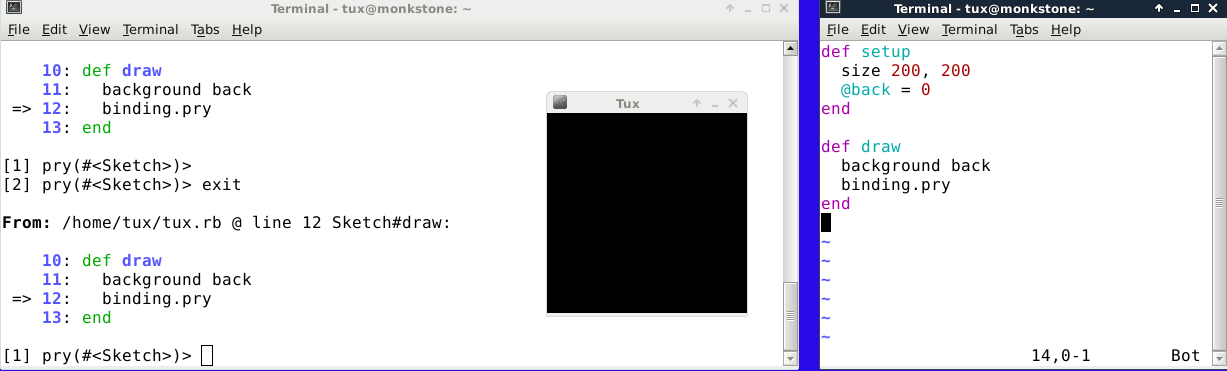
What good it is, is best tested by pry afficianados, however it also occured to me that there is an alternative way of introducing/using pry. If you start a sketch in the "watch" mode you can edit the live sketch to:-
require 'pry'
# and where you want the break
binding.pry
This also works but again I'm no pry afficianado, so I will leave it to them to decide how best to proceed, but in this scenario you could edit the sketch either from pry, or with an independent editor (tested with vim for both in my case). See below, here I found I was able to set the @back variable directly (no need to call $app). In this I started the sketch in the watch mode, and edited in vim (right-hand terminal, with and unusual white background for me!!)
Now this is slightly interesting, instead of continuing to type $app in the pry repl, you can assign to app `binding = $app`. Then just carry on as though you are editing a regular ruby sketch...

Followers

About Me

My photo
I have developed JRubyArt and propane new versions of ruby-processing for JRuby-9.1.5.0 and processing-3.2.2