load_library :glw

include_package 'processing.glw'

def setup
  size(2560, 1440, GLW::P2D)
  frame_rate(180) # NB: here we are using the "processing" set frame rate method
end

def draw
  background(255, 0, 0)
  fill(255)
  # NB: here we access "processing" frame rate variable
  text("FPS: #{frame_rate}", mouse_x, mouse_y)
end
Tuesday, 19 November 2013
Testing the GLW renderer with ruby-processing
Andreas Colubri is working on an alternative renderer for processing (which seems to be stabilising as the GLW renderer). Here is an example sketch translated to ruby-processing requires processing-2.1.1 to run (OK development version as that is not currently available).

Tuesday, 12 November 2013
Working towards returning ruby-processing to gem distribution by rubygems.org
I have made the first steps toward returning ruby-processing to rubygems distribution. See my fork on github. This is work in progress, however it does work on Archlinux, and also should also work on the MAC, where the path to the processing jars should be stable?
- Install processing-2.1.0 (for your OS)
- Create or edit the YAML .rp5rc file to point to processing-root possibly using the sketch below (in the processing ide) config.pde
- Clone my fork
- cd ruby-processing (or whatever you call it)
- rake (MAC and linux) to see if tests work
- gem install ruby-processing-{version}.gem for more comprehensive testing
String processingRoot = "enter your processing root here"; // edit this line in the sketch
String home;
PFont font;

void setup() {
  size(400, 200);
  font = createFont("Helvetica", 18);
  home = System.getProperty("user.home");
}

void draw() {
  background(255);
  fill(255, 0, 0);
  textFont(font, 18);
  // this adds a blinking cursor after your text, at the expense of redrawing everything every frame
  text(processingRoot+(frameCount/10 % 2 == 0 ? "_" : ""), 35, 45);
}

void keyReleased() {
  if (key != CODED) {
    switch(key) {
    case BACKSPACE:
      processingRoot = processingRoot.substring(0, max(0, processingRoot.length()-1));
      break;
    case ENTER:   // save the processing root to the config file
    case RETURN:
      PrintWriter pw = createWriter(home + "/.rp5rc");
      pw.write("PROCESSING_ROOT: \"" + processingRoot + "\"");
      pw.close();
      break;
    case ESC:
    case DELETE:
      break;
    default:
      processingRoot += key;
    }
  }
}
Saturday, 2 November 2013
Promise for the future of jruby, ruby-processing
It was probably a bit too early when I last looked at tuning ruby processing, because it preceded the processing-2.1 release (now compiled for java 7, which means I can run ruby-processing with java 8). Also since I am looking to the future I will use jruby-9000.dev for future performance tests. The esfera test is good because it is dynamic (you can actually see both compiler and garbage collector kick-in, well thats unless I'm very much mistaken). Here are past results combined with current results using jruby-complete-9000.dev (2 November 2013 snapshot). On continued running current test stabilised at ca 6 fps. What the test doesn't show is elapsed time, because there is actual pause seen when I presume compiler kicks in (and the later lesser dips in performance must be the garbage collector).
These are my java args for the test (jdk 7 unless stated)
java_args.txt
PS: linux users it may also be worth doing the following, one-time exercise, to improve java startup
java_args.txt
- None
- Args 1. -XX:+TieredCompilation XX:CompileCommand=dontinline,org.jruby.runtime.invokedynamic.InvokeDynamicSupport::invocationFallback
- Args 2. -XX:+TieredCompilation -XX:TieredStopAtLevel=1 XX:CompileCommand=dontinline,org.jruby.runtime.invokedynamic.InvokeDynamicSupport::invocationFallback
- Args Java 8 -Xms2048M -Xmx2048M -XX:+UnlockExperimentalVMOptions -XX:G1NewSizePercent=20 -XX:G1MaxNewSizePercent=80.
| No Args | Args 1 | Args 2 | Java 8 |
|---|---|---|---|
| 5.4547 | 5.17617 | 4.70084 | 5.27 |
| 4.26695 | 3.71662 | 2.90269 | 4.24 |
| 3.85179 | 3.22197 | 2.30053 | 3.889 |
| 3.769622 | 3.105720 | 2.077115 | 3.70 |
| 3.769622 | 3.122121 | 2.022429 | 4.15 |
| 3.756052 | 3.340643 | 1.940190 | 4.98 |
| 4.849481 | 3.122121 | 1.953019 | 5.03 |
| 5.173814 | 3.34064 | 5.09 |
PS: linux users it may also be worth doing the following, one-time exercise, to improve java startup
sudo java -Xshare:dump
For Rails Hackers
I'm a bit disappointed so far with the response to my updating of ruby-processing to run with processing-2.1. Perhaps interest in the ruby language is on the decline, or could it be that rails hackers have become so dependent on their frameworks/tools they find it a challenge to work outside them (I mean just look at Shoes4 lots of meaningless tests many contributors, and it is travelling at snails pace to where? _why is surely less than impressed)!!! For inspiration just check out the Karsten Schmidt story.
Eyeo 2013 - Karsten Schmidt from Eyeo Festival on Vimeo.
Eyeo 2013 - Karsten Schmidt from Eyeo Festival on Vimeo.
Wednesday, 30 October 2013
An opportunity to restore ruby-processing as a rubygem distributable gem?
It occurs to me that at least on ArchLinux (since processing-2.0.1) and the Mac (since processing-2.1) the location (path) of processing jars could be relied on (albeit OS specific). Further the majority of sketches can now be run with an installed jruby (which is now the default) thus we could exclude jruby-complete and the processing jars from the gem, and we would easily return to rubygems distribution. It would be sensible to retain the the jruby-complete as an optional post install to enable access to shader sketches and possibly still support application export, although that would not be a priority. The folks at processing are still inviting integration with the processing ide (see below), but I would prefer ruby-processing to stick with the ruby ecology.
Our sister project Ruby-Processing version 2.2.0 is now available from github: https://t.co/rC2Quwz3hz
— Processing (@ProcessingOrg) October 10, 2013
Who wants to make a Ruby-Processing Mode for the PDE?
— Processing (@ProcessingOrg) October 10, 2013
Saturday, 26 October 2013
Using shaders in ruby-processing (tutorial example translated)
Anyone interested in using shaders in ruby-processing should read the vanilla processing tutorial here. All the code for the tutorial is available here, including the necessary glsl shader (and image) files used in this sketch, which is translated from one of the included examples.You might also like to read the codeanticode blog (by Andrés Colubri) to keep up to date with latest developments.
# Texture from Jason Liebig's FLICKR collection of vintage labels and wrappers:
# http://www.flickr.com/photos/jasonliebigstuff/3739263136/in/photostream/

CAN_SIZE = 60

attr_reader :label, :can, :cap, :angle, :color_shader, :light_shader, :texlight_shader
attr_reader :sel_shader, :pixlight_shader, :tex_shader, :texlightx_shader, :bw_shader
attr_reader :edges_shader, :use_texture, :use_light, :emboss_shader

def setup
  size(480, 480, P3D)
  @label = load_image("lachoy.jpg")
  @can = create_can(CAN_SIZE, 2 * CAN_SIZE, 32, label)
  @cap = create_cap(CAN_SIZE, 32)
  @angle = 0
  @color_shader = load_shader("colorfrag.glsl", "colorvert.glsl")
  @light_shader = load_shader("lightfrag.glsl", "lightvert.glsl")
  @tex_shader = load_shader("texfrag.glsl", "texvert.glsl")

  @texlight_shader = load_shader("texlightfrag.glsl", "texlightvert.glsl")
  @pixlight_shader = load_shader("pixlightfrag.glsl", "pixlightvert.glsl")
  @texlightx_shader = load_shader("pixlightxfrag.glsl", "pixlightxvert.glsl")

  @bw_shader = load_shader("bwfrag.glsl")
  @edges_shader = load_shader("edgesfrag.glsl")
  @emboss_shader = load_shader("embossfrag.glsl")

  @sel_shader = texlight_shader
  @use_light = true
  @use_texture = true
  puts "Vertex lights, texture shading"
end

def draw
  background(0)

  x = 1.88 * CAN_SIZE
  y = 2 * CAN_SIZE
  3.times do
    3.times do
      draw_can(x, y, angle)
      x += (2 * CAN_SIZE + 8)
    end
    x = 1.88 * CAN_SIZE
    y += (2 * CAN_SIZE + 5)
  end

  @angle += 0.01
end

def draw_can( centerx, centery, rot_angle)
  push_matrix

  if (use_light)
    point_light(255, 255, 255, centerx, centery, 200)
  end
  shader(sel_shader)

  translate(centerx, centery, 65)
  rotate_y(rot_angle)
  if (use_texture)
    can.set_texture(label)
  else
    can.set_texture(nil)
  end
  shape(can)
  no_lights

  reset_shader

  push_matrix
  translate(0, CAN_SIZE - 5, 0)
  shape(cap)
  pop_matrix

  push_matrix
  translate(0, -CAN_SIZE + 5, 0)
  shape(cap)
  pop_matrix

  pop_matrix
end

def create_can(r, h, detail, tex)
  texture_mode(NORMAL)
  sh = create_shape
  sh.begin_shape(QUAD_STRIP)
  sh.no_stroke
  sh.texture(tex)
  (0 .. detail).each do |i|
    angle = TAU / detail
    x = sin(i * angle)
    z = cos(i * angle)
    u = i.to_f / detail
    sh.normal(x, 0, z)
    sh.vertex(x * r, -h/2, z * r, u, 0)
    sh.vertex(x * r, +h/2, z * r, u, 1)
  end
  sh.end_shape
  return sh
end

def create_cap(r, detail)
  sh = create_shape
  sh.begin_shape(TRIANGLE_FAN)
  sh.no_stroke
  sh.fill(128)
  sh.vertex(0, 0, 0)
  (0 ... detail).each do |i|
    angle = TAU / detail
    x = sin(i * angle)
    z = cos(i * angle)
    sh.vertex(x * r, 0, z * r)
  end
  sh.end_shape
  return sh
end

def key_pressed
  case key
  when '1'
    puts "No lights, no texture shading"
    @sel_shader = color_shader
    @use_light = false
    @use_texture = false
  when '2'
    puts "Vertex lights, no texture shading"
    @sel_shader = light_shader
    @use_light = true
    @use_texture = false
  when '3'
    puts "No lights, texture shading"
    @sel_shader = tex_shader
    @use_light = false
    @use_texture = true
  when '4'
    puts "Vertex lights, texture shading"
    @sel_shader = texlight_shader
    @use_light = true
    @use_texture = true
  when '5'
    puts "Pixel lights, no texture shading"
    @sel_shader = pixlight_shader
    @use_light = true
    @use_texture = false
  when '6'
    puts "Pixel lights, texture shading"
    @sel_shader = texlightx_shader
    @use_light = true
    @use_texture = true
  when '7'
    puts "Black&white texture filtering"
    @sel_shader = bw_shader
    @use_light = false
    @use_texture = true
  when '8'
    puts "Edge detection filtering"
    @sel_shader = edges_shader
    @use_light = false
    @use_texture = true
  when '9'
    puts "Emboss filtering"
    @sel_shader = emboss_shader
    @use_light = false
    @use_texture = true
  end
end
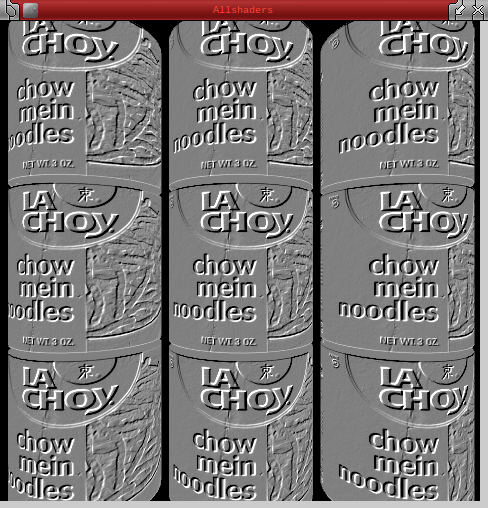 |
| Emboss Filtering |
Friday, 25 October 2013
Low Level GL Shader Sketch in Ruby-Processing
Here is a sketch translated from the vanilla processing examples (where to get frag.gsl and vert.gsl), to run on the latest version of ruby-processing.

include_package 'java.nio'
java_import 'processing.opengl.PGL'


attr_reader :sh, :vert_loc, :color_loc, :vert_data, :color_data

def setup
  size(640, 360, P3D)

  # Loads a shader to render geometry w/out
  # textures and lights.
  @sh = loadShader("frag.glsl", "vert.glsl")
  @vert_data = allocate_direct_float_buffer(12)
  @color_data = allocate_direct_float_buffer(12)
end

def draw
  background(0)

  # The geometric transformations will be automatically passed
  # to the shader.
  rotate(frame_count * 0.01, width, height, 0)

  update_geometry

  pgl = beginPGL
  sh.bind

  @vert_loc = pgl.getAttribLocation(sh.glProgram, "vertex")
  @color_loc = pgl.getAttribLocation(sh.glProgram, "color")

  pgl.enableVertexAttribArray(vert_loc)
  pgl.enableVertexAttribArray(color_loc)

  pgl.vertexAttribPointer(vert_loc, 4, PGL.FLOAT, false, 0, vert_data)
  pgl.vertexAttribPointer(color_loc, 4, PGL.FLOAT, false, 0, color_data)

  pgl.drawArrays(PGL.TRIANGLES, 0, 3)

  pgl.disableVertexAttribArray(vert_loc)
  pgl.disableVertexAttribArray(color_loc)

  sh.unbind

  endPGL
end

def update_geometry
  # Vertex 1
  vertices = [0, 0, 0, 1]
  colors = [1, 0, 0, 1]

  # Corner 2
  vertices += [width/2, height, 0, 1]
  colors += [0, 1, 0, 1]

  # Corner 3
  vertices += [width, 0, 0, 1]
  colors += [0, 0, 1, 1]

  vert_data.rewind
  vert_data.put(vertices.to_java :float)
  vert_data.position(0)

  color_data.rewind
  color_data.put(colors.to_java :float)
  color_data.position(0)
end

def allocate_direct_float_buffer(n)
  ByteBuffer.allocateDirect(n * java.lang.Float::SIZE/8).order(ByteOrder.nativeOrder).asFloatBuffer
end

Subscribe to:
Posts (Atom)
About Me

- monkstone
- I have developed JRubyArt and propane new versions of ruby-processing for JRuby-9.1.5.0 and processing-3.2.2