# Earth model with bump mapping, specular texture and dynamic cloud layer.
# Adapted from the THREE.js tutorial to processing by Andres Colubri,
# translated to JRubyArt by Martin Prout:
# http://learningthreejs.com/blog/2013/09/16/how-to-make-the-earth-in-webgl/

attr_reader :earth, :clouds, :earth_shader, :cloud_shader, :earth_rotation
attr_reader :clouds_rotation, :target_angle

def setup
  sketch_title 'Blue Marble'
  @earth_rotation = 0
  @clouds_rotation = 0
  earth_tex = load_image('earthmap1k.jpg')
  cloud_tex = load_image('earthcloudmap.jpg')
  alpha_tex = load_image('earthcloudmaptrans.jpg')
  bump_map = load_image('earthbump1k.jpg')
  spec_map = load_image('earthspec1k.jpg')
  @earth_shader = load_shader('EarthFrag.glsl', 'EarthVert.glsl')
  earth_shader.set('texMap', earth_tex)
  earth_shader.set('bumpMap', bump_map)
  earth_shader.set('specularMap', spec_map)
  earth_shader.set('bumpScale', 0.05)
  @cloud_shader = load_shader('CloudFrag.glsl', 'CloudVert.glsl')
  cloud_shader.set('texMap', cloud_tex)
  cloud_shader.set('alphaMap', alpha_tex)
  @earth = create_shape(SPHERE, 200)
  earth.setStroke(false)
  earth.setSpecular(color(125))
  earth.setShininess(10)
  @clouds = create_shape(SPHERE, 201)
  clouds.setStroke(false)
end

def draw
  background(0)
  translate(width / 2, height / 2)
  point_light(255, 255, 255, 300, 0, 500)
  target_angle = map1d(mouse_x, (0..width), (0..TWO_PI))
  @earth_rotation += 0.05 * (target_angle - earth_rotation)
  shader(earth_shader)
  push_matrix
  rotate_y(earth_rotation)
  shape(earth)
  pop_matrix
  shader(cloud_shader)
  push_matrix
  rotate_y(earth_rotation + clouds_rotation)
  shape(clouds)
  pop_matrix
  @clouds_rotation += 0.001
end

def settings
  size(600, 600, P3D)
end
Showing posts with label GLSL shader. Show all posts
Showing posts with label GLSL shader. Show all posts
Thursday, 27 August 2015
Advanced shader sketches in JRubyArt
Andres Colubri has published some advanced shader experiments here for processing-3.0, this is one of the examples translated for JRubyArt (requires shader files from the repo. See also Andres write-up on Advanced-OpenGL. Cool sketch of a textured Earth with an independent cloud layer.

Saturday, 26 October 2013
Using shaders in ruby-processing (tutorial example translated)
Anyone interested in using shaders in ruby-processing should read the vanilla processing tutorial here. All the code for the tutorial is available here, including the necessary glsl shader (and image) files used in this sketch, which is translated from one of the included examples.You might also like to read the codeanticode blog (by Andrés Colubri) to keep up to date with latest developments.
# Texture from Jason Liebig's FLICKR collection of vintage labels and wrappers:
# http://www.flickr.com/photos/jasonliebigstuff/3739263136/in/photostream/

CAN_SIZE = 60

attr_reader :label, :can, :cap, :angle, :color_shader, :light_shader, :texlight_shader
attr_reader :sel_shader, :pixlight_shader, :tex_shader, :texlightx_shader, :bw_shader
attr_reader :edges_shader, :use_texture, :use_light, :emboss_shader

def setup
  size(480, 480, P3D)
  @label = load_image("lachoy.jpg")
  @can = create_can(CAN_SIZE, 2 * CAN_SIZE, 32, label)
  @cap = create_cap(CAN_SIZE, 32)
  @angle = 0
  @color_shader = load_shader("colorfrag.glsl", "colorvert.glsl")
  @light_shader = load_shader("lightfrag.glsl", "lightvert.glsl")
  @tex_shader = load_shader("texfrag.glsl", "texvert.glsl")

  @texlight_shader = load_shader("texlightfrag.glsl", "texlightvert.glsl")
  @pixlight_shader = load_shader("pixlightfrag.glsl", "pixlightvert.glsl")
  @texlightx_shader = load_shader("pixlightxfrag.glsl", "pixlightxvert.glsl")

  @bw_shader = load_shader("bwfrag.glsl")
  @edges_shader = load_shader("edgesfrag.glsl")
  @emboss_shader = load_shader("embossfrag.glsl")

  @sel_shader = texlight_shader
  @use_light = true
  @use_texture = true
  puts "Vertex lights, texture shading"
end

def draw
  background(0)

  x = 1.88 * CAN_SIZE
  y = 2 * CAN_SIZE
  3.times do
    3.times do
      draw_can(x, y, angle)
      x += (2 * CAN_SIZE + 8)
    end
    x = 1.88 * CAN_SIZE
    y += (2 * CAN_SIZE + 5)
  end

  @angle += 0.01
end

def draw_can( centerx, centery, rot_angle)
  push_matrix

  if (use_light)
    point_light(255, 255, 255, centerx, centery, 200)
  end
  shader(sel_shader)

  translate(centerx, centery, 65)
  rotate_y(rot_angle)
  if (use_texture)
    can.set_texture(label)
  else
    can.set_texture(nil)
  end
  shape(can)
  no_lights

  reset_shader

  push_matrix
  translate(0, CAN_SIZE - 5, 0)
  shape(cap)
  pop_matrix

  push_matrix
  translate(0, -CAN_SIZE + 5, 0)
  shape(cap)
  pop_matrix

  pop_matrix
end

def create_can(r, h, detail, tex)
  texture_mode(NORMAL)
  sh = create_shape
  sh.begin_shape(QUAD_STRIP)
  sh.no_stroke
  sh.texture(tex)
  (0 .. detail).each do |i|
    angle = TAU / detail
    x = sin(i * angle)
    z = cos(i * angle)
    u = i.to_f / detail
    sh.normal(x, 0, z)
    sh.vertex(x * r, -h/2, z * r, u, 0)
    sh.vertex(x * r, +h/2, z * r, u, 1)
  end
  sh.end_shape
  return sh
end

def create_cap(r, detail)
  sh = create_shape
  sh.begin_shape(TRIANGLE_FAN)
  sh.no_stroke
  sh.fill(128)
  sh.vertex(0, 0, 0)
  (0 ... detail).each do |i|
    angle = TAU / detail
    x = sin(i * angle)
    z = cos(i * angle)
    sh.vertex(x * r, 0, z * r)
  end
  sh.end_shape
  return sh
end

def key_pressed
  case key
  when '1'
    puts "No lights, no texture shading"
    @sel_shader = color_shader
    @use_light = false
    @use_texture = false
  when '2'
    puts "Vertex lights, no texture shading"
    @sel_shader = light_shader
    @use_light = true
    @use_texture = false
  when '3'
    puts "No lights, texture shading"
    @sel_shader = tex_shader
    @use_light = false
    @use_texture = true
  when '4'
    puts "Vertex lights, texture shading"
    @sel_shader = texlight_shader
    @use_light = true
    @use_texture = true
  when '5'
    puts "Pixel lights, no texture shading"
    @sel_shader = pixlight_shader
    @use_light = true
    @use_texture = false
  when '6'
    puts "Pixel lights, texture shading"
    @sel_shader = texlightx_shader
    @use_light = true
    @use_texture = true
  when '7'
    puts "Black&white texture filtering"
    @sel_shader = bw_shader
    @use_light = false
    @use_texture = true
  when '8'
    puts "Edge detection filtering"
    @sel_shader = edges_shader
    @use_light = false
    @use_texture = true
  when '9'
    puts "Emboss filtering"
    @sel_shader = emboss_shader
    @use_light = false
    @use_texture = true
  end
end
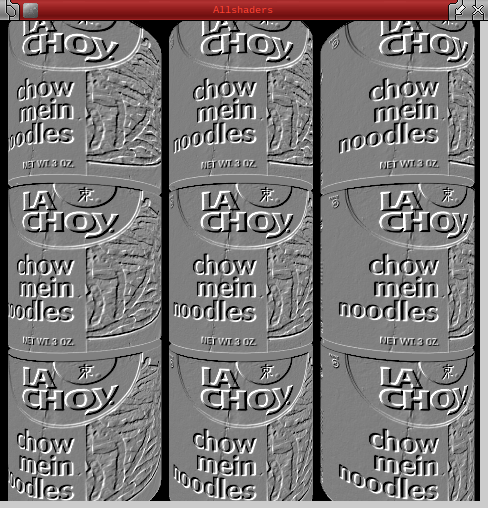 |
| Emboss Filtering |
Friday, 25 October 2013
Low Level GL Shader Sketch in Ruby-Processing
Here is a sketch translated from the vanilla processing examples (where to get frag.gsl and vert.gsl), to run on the latest version of ruby-processing.

include_package 'java.nio'
java_import 'processing.opengl.PGL'


attr_reader :sh, :vert_loc, :color_loc, :vert_data, :color_data

def setup
  size(640, 360, P3D)

  # Loads a shader to render geometry w/out
  # textures and lights.
  @sh = loadShader("frag.glsl", "vert.glsl")
  @vert_data = allocate_direct_float_buffer(12)
  @color_data = allocate_direct_float_buffer(12)
end

def draw
  background(0)

  # The geometric transformations will be automatically passed
  # to the shader.
  rotate(frame_count * 0.01, width, height, 0)

  update_geometry

  pgl = beginPGL
  sh.bind

  @vert_loc = pgl.getAttribLocation(sh.glProgram, "vertex")
  @color_loc = pgl.getAttribLocation(sh.glProgram, "color")

  pgl.enableVertexAttribArray(vert_loc)
  pgl.enableVertexAttribArray(color_loc)

  pgl.vertexAttribPointer(vert_loc, 4, PGL.FLOAT, false, 0, vert_data)
  pgl.vertexAttribPointer(color_loc, 4, PGL.FLOAT, false, 0, color_data)

  pgl.drawArrays(PGL.TRIANGLES, 0, 3)

  pgl.disableVertexAttribArray(vert_loc)
  pgl.disableVertexAttribArray(color_loc)

  sh.unbind

  endPGL
end

def update_geometry
  # Vertex 1
  vertices = [0, 0, 0, 1]
  colors = [1, 0, 0, 1]

  # Corner 2
  vertices += [width/2, height, 0, 1]
  colors += [0, 1, 0, 1]

  # Corner 3
  vertices += [width, 0, 0, 1]
  colors += [0, 0, 1, 1]

  vert_data.rewind
  vert_data.put(vertices.to_java :float)
  vert_data.position(0)

  color_data.rewind
  color_data.put(colors.to_java :float)
  color_data.position(0)
end

def allocate_direct_float_buffer(n)
  ByteBuffer.allocateDirect(n * java.lang.Float::SIZE/8).order(ByteOrder.nativeOrder).asFloatBuffer
end

Monday, 9 September 2013
Planetarium calibrate sketch in ruby-processing
load_libraries :planetarium, :control_panel
include_package 'codeanticode.planetarium'

attr_reader :cube_x, :cube_y, :panel, :hide, :camera, :grid

def setup
  # For the time being, only use square windows
  size(600, 600, Dome::RENDERER)
  @camera = DomeCamera.new(self)
  @hide = false
  @grid = true
  control_panel do |c|
    c.title = "Control"
    c.look_feel "Metal"
    c.slider    :cube_x,  -width / 2.0 .. width / 2.0, -60.0
    c.slider    :cube_y,  -height / 2.0 .. height / 2.0, 60.0
    @panel = c
  end
end

def mouse_pressed
  @hide = false if hide  # use mouse click to restore control panel
end

# Called five times per frame.
def draw
  unless hide
    @hide = true
    panel.set_visible hide
  end
  face = camera.getFace
  case(face)
  when DomeCamera::POSITIVE_X
  background(240, 59, 31)
  when DomeCamera::NEGATIVE_X
  background(240, 146, 31)
  when DomeCamera::POSITIVE_Y
  background(30, 245, 0)
  when DomeCamera::NEGATIVE_Y
  background(30, 232, 156)
  when DomeCamera::POSITIVE_Z
  background(52, 148, 206)
  when DomeCamera::NEGATIVE_Z
  background(183, 115, 13)
  end

  push_matrix
  translate(width/2, height/2, 300)

  stroke(255)
  noFill

  push_matrix
  translate(cube_x, cube_y, 0)
  sphere_detail(8)
  sphere(30)
  pop_matrix

  lines_amount = 10
  (0 ... lines_amount).each do |i|
    ratio = i/(lines_amount - 1.0)
    line(0, 0, cos(ratio * TWO_PI) * 50, sin(ratio * TWO_PI) * 50)
  end
  pop_matrix
end

def key_pressed
  @grid = !grid
  (grid)? camera.set_mode(Dome::GRID) : camera.set_mode(Dome::NORMAL)
end

New Improved Planetarium Basic Sketch
That is more like it decent controls, no need for that reflection nonsense. Another example using Andrés Colubri's planetarium library.

# The planetarium library is designed to create real-time projections on
# spherical domes. It is based on the FullDome project by Christopher
# Warnow (ch.warnow@gmx.de):
# https://github.com/mphasize/FullDome
#
# A brief descrition on how it works: a 360° view of the scene is generated
# by rendering the scene 6 times from each direction: positive x, negative x,
# positive y, and so on. The output of each rendering is stored inside a cube map
# texture, which is then applied on a sphere representing the dome.
# Hence, the library calls the draw method 6 times per frame in order to update
# the corresponding side of the cube map texture (in reality, only 5 times since
# the bottom side of the cube map is not invisible on the dome).
# New improved version using control panel no need for reflection "nastiness"

load_libraries :planetarium, :control_panel
include_package 'codeanticode.planetarium'

attr_reader :cube_x, :cube_y, :cube_z, :panel, :hide

def setup
  # For the time being, only use square windows
  size(600, 600, Dome::RENDERER)
  @hide = false
  control_panel do |c|
    c.title = "Control"
    c.look_feel "Metal"
    c.slider    :cube_x,  -width / 2.0 .. width / 2.0, 10.0
    c.slider    :cube_y,  -height / 2.0 .. height / 2.0, 10.0
    c.slider    :cube_z,  -width / 2.0 .. 0, -20.0
    @panel = c
  end
end

def mouse_pressed
  @hide = false if hide  # use mouse click to restore control panel
end

# Called five times per frame.
def draw
  unless hide
    @hide = true
    panel.set_visible(hide)
  end
  background(0)

  push_matrix
  translate(width/2, height/2, 300)

  lights

  stroke(0)
  fill(150)
  push_matrix
  translate(cube_x, cube_y, cube_z)
  box(50)
  pop_matrix

  stroke(255)
  lines_amount = 10
  (0 ... lines_amount).each do |i|
    ratio = i/(lines_amount - 1.0)
    line(0, 0, cos(ratio * TWO_PI) * 50, sin(ratio * TWO_PI) * 50)
  end
  pop_matrix
end

Wednesday, 4 September 2013
Dome Projection Shader
Latest processing shader example by Andres Colubri, sketch requires features that will be available in ruby-processing-2.1.5, also requires shader files, and to be run with the --nojruby flag:-

#
# DomeProjection
#
# This sketch uses use environmental mapping to render the output
# on a full spherical dome.
#
# Based on the FullDome_template code from Christopher Warnow:
# https://github.com/mphasize/FullDome
#
#

attr_reader :fbo, :cube_map_shader, :dome_sphere, :env_map_texture_id

ENV_MAP_SIZE = 1024

def setup
  size(640, 640, P3D)
  init_cube_map
end

def draw
  background(0)
  draw_cube_map
end

def draw_scene
  background(0)
  stroke(255, 0, 0)
  stroke_weight(2)

  (-width ... 2 * width).step(50) do |i|
    line(i, -height, -100, i, 2 * height, -100)
  end
  (-height ... 2 * height).step(50) do |i|
    line(-width, i, -100, 2 * width, i, -100)
  end

  lights
  no_stroke
  translate(mouse_x, mouse_y, 200)
  rotate_x(frame_count * 0.01)
  rotate_y(frame_count * 0.01)
  box(100)
end

java_import "java.nio.IntBuffer"

def init_cube_map
  sphere_detail(50)
  @dome_sphere = create_shape(SPHERE, height/2.0)
  dome_sphere.rotate_x(HALF_PI)
  dome_sphere.set_stroke(false)

  pgl = beginPGL

  @env_map_texture_id = IntBuffer.allocate(1)
  pgl.gen_textures(1, env_map_texture_id)
  pgl.bind_texture(PGL::TEXTURE_CUBE_MAP, env_map_texture_id.get(0))
  pgl.texParameteri(PGL::TEXTURE_CUBE_MAP, PGL::TEXTURE_WRAP_S, PGL::CLAMP_TO_EDGE)
  pgl.texParameteri(PGL::TEXTURE_CUBE_MAP, PGL::TEXTURE_WRAP_T, PGL::CLAMP_TO_EDGE)
  pgl.texParameteri(PGL::TEXTURE_CUBE_MAP, PGL::TEXTURE_WRAP_R, PGL::CLAMP_TO_EDGE)
  pgl.texParameteri(PGL::TEXTURE_CUBE_MAP, PGL::TEXTURE_MIN_FILTER, PGL::NEAREST)
  pgl.texParameteri(PGL::TEXTURE_CUBE_MAP, PGL::TEXTURE_MAG_FILTER, PGL::NEAREST)
  (PGL::TEXTURE_CUBE_MAP_POSITIVE_X ... PGL::TEXTURE_CUBE_MAP_POSITIVE_X + 6).each do |i|
    pgl.texImage2D(i, 0, PGL::RGBA8, ENV_MAP_SIZE, ENV_MAP_SIZE, 0, PGL::RGBA, PGL::UNSIGNED_BYTE, nil)
  end

  # Init fbo, rbo
  @fbo = IntBuffer.allocate(1)
  rbo = IntBuffer.allocate(1)
  pgl.genFramebuffers(1, fbo)
  pgl.bindFramebuffer(PGL::FRAMEBUFFER, fbo.get(0))
  pgl.framebufferTexture2D(PGL::FRAMEBUFFER, PGL::COLOR_ATTACHMENT0, PGL::TEXTURE_CUBE_MAP_POSITIVE_X, env_map_texture_id.get(0), 0)

  pgl.genRenderbuffers(1, rbo)
  pgl.bindRenderbuffer(PGL::RENDERBUFFER, rbo.get(0))
  pgl.renderbufferStorage(PGL::RENDERBUFFER, PGL::DEPTH_COMPONENT24, ENV_MAP_SIZE, ENV_MAP_SIZE)

  # Attach depth buffer to FBO
  pgl.framebufferRenderbuffer(PGL::FRAMEBUFFER, PGL::DEPTH_ATTACHMENT, PGL::RENDERBUFFER, rbo.get(0))

  pgl.enable(PGL::TEXTURE_CUBE_MAP)
  pgl.active_texture(PGL::TEXTURE1)
  pgl.bind_texture(PGL::TEXTURE_CUBE_MAP, env_map_texture_id.get(0))

  endPGL

  # Load cubemap shader.
  @cube_map_shader = load_shader("cubemapfrag.glsl", "cubemapvert.glsl")
  cube_map_shader.set("cubemap", 1)
end

def draw_cube_map
  regenerateEnvMap
  drawDomeMaster
end

def drawDomeMaster
  ortho
  reset_matrix
  shader(cube_map_shader)
  shape(dome_sphere)
  reset_shader
end

# Called to regenerate the envmap
def regenerateEnvMap
  pgl = beginPGL

  # bind fbo
  pgl.bindFramebuffer(PGL::FRAMEBUFFER, fbo.get(0))

  # generate 6 views from origin(0, 0, 0)
  pgl.viewport(0, 0, ENV_MAP_SIZE, ENV_MAP_SIZE)
  perspective(90.0 * DEG_TO_RAD, 1.0, 1.0, 1025.0)
  (PGL::TEXTURE_CUBE_MAP_POSITIVE_X ... PGL::TEXTURE_CUBE_MAP_NEGATIVE_Z).each do |face|
    reset_matrix
    case face
    when PGL::TEXTURE_CUBE_MAP_POSITIVE_X
      camera(0.0, 0.0, 0.0, 1.0, 0.0, 0.0, 0.0, -1.0, 0.0)
    when PGL::TEXTURE_CUBE_MAP_NEGATIVE_X
      camera(0.0, 0.0, 0.0, -1.0, 0.0, 0.0, 0.0, -1.0, 0.0)
    when PGL::TEXTURE_CUBE_MAP_POSITIVE_Y
      camera(0.0, 0.0, 0.0, 0.0, -1.0, 0.0, 0.0, 0.0, -1.0)
    when PGL::TEXTURE_CUBE_MAP_NEGATIVE_Y
      camera(0.0, 0.0, 0.0, 0.0, 1.0, 0.0, 0.0, 0.0, 1.0)
    when PGL::TEXTURE_CUBE_MAP_POSITIVE_Z
      camera(0.0, 0.0, 0.0, 0.0, 0.0, 1.0, 0.0, -1.0, 0.0)
    end

    scale(-1, 1, -1)
    translate(-width * 0.5, -height * 0.5, -500)
    pgl.framebufferTexture2D(PGL::FRAMEBUFFER, PGL::COLOR_ATTACHMENT0, face, env_map_texture_id.get(0), 0)
    draw_scene# Draw objects in the scene
    flush# Make sure that the geometry in the scene is pushed to the GPU
    no_lights # Disabling lights to avoid adding many times
    pgl.framebufferTexture2D(PGL::FRAMEBUFFER, PGL::COLOR_ATTACHMENT0, face, 0, 0)
  end

  endPGL
end

Wednesday, 5 June 2013
Ditching jruby-complete, what is holding me back?
Well it is only the glsl shader sketches (I think). So something is added by including the jruby-complete.jar classpath in the command line that allows these sketches to run. So one area of experimentation is to try to add similar classpath when firing up ruby-processing using jruby, rather than from java.
Something that enables compiling of glsl shaders?
-J-cp="${RP5_ROOT}/lib/core/"
Something that enables compiling of glsl shaders?
Useful Bookmarks?
- http://www.compoundtheory.com/
- https://github.com/markmandel/jruby-lwjgl
- http://codeanticode.wordpress.com/tag/glsl/
- http://arcsynthesis.org/gltut/
Wednesday, 20 February 2013
Shader API changed in latest processing version at GitHub
Looks as there will a simpler (well at least abbreviated) shader language in processing. This is probably a good idea as it may de-couple processing from changes to native glsl whatever that is. Anyway more work to on my ruby-processing shader examples ho-hum. Anyway it got me thinking would it be nice to have a text editor for this glsl language, turns out there is community contributed mode over at JEdit, with a bit of hacking I guess I can create a mode tuned for processing, perfect...
   1 #define PROCESSING_COLOR_SHADER
   2
   3 uniform float time;
   4 uniform vec2 resolution;
   5
   6 // NEBULA - CoffeeBreakStudios.com (CBS)
   7 // Work in progress...
   8 //
   9 // 3148.26: Switched from classic to simplex noise
  10 // 3148.27: Reduced number of stars
  11 // 3249.0:  Switched to fast computed 3D noise. Less quality but ~ 2x faster
  12 // 3249.5:  Removed use of random number generator to gain performance
  13 // 3265.0:  Added rotation: glsl.heroku.com/e#3005.1
  14
  15 //Utility functions
  16
  17 vec3 fade(vec3 t) {
  18   return vec3(1.0,1.0,1.0);//t*t*t*(t*(t*6.0-15.0)+10.0);
  19 }
  20
  21 vec2 rotate(vec2 point, float rads) {
  22   float cs = cos(rads);
  23   float sn = sin(rads);
  24   return point * mat2(cs, -sn, sn, cs);
  25 }
  26
  27 vec4 randomizer4(const vec4 x)
  28 {
  29     vec4 z = mod(x, vec4(5612.0));
  30     z = mod(z, vec4(3.1415927 * 2.0));
  31     return(fract(cos(z) * vec4(56812.5453)));
  32 }
  33
  34 // Fast computed noise
  35 // http://www.gamedev.net/topic/502913-fast-computed-noise/
  36
  37 const float A = 1.0;
  38 const float B = 57.0;
  39 const float C = 113.0;
  40 const vec3 ABC = vec3(A, B, C);
  41 const vec4 A3 = vec4(0, B, C, C+B);
  42 const vec4 A4 = vec4(A, A+B, C+A, C+A+B);
  43
  44 float cnoise4(const in vec3 xx)
  45 {
  46     vec3 x = mod(xx + 32768.0, 65536.0);
  47     vec3 ix = floor(x);
  48     vec3 fx = fract(x);
  49     vec3 wx = fx*fx*(3.0-2.0*fx);
  50     float nn = dot(ix, ABC);
  51
  52     vec4 N1 = nn + A3;
  53     vec4 N2 = nn + A4;
  54     vec4 R1 = randomizer4(N1);
  55     vec4 R2 = randomizer4(N2);
  56     vec4 R = mix(R1, R2, wx.x);
  57     float re = mix(mix(R.x, R.y, wx.y), mix(R.z, R.w, wx.y), wx.z);
  58
  59     return 1.0 - 2.0 * re;
  60 }
  61 float surface3 ( vec3 coord, float frequency ) {
  62
  63   float n = 0.0;
  64
  65   n += 1.0  * abs( cnoise4( coord * frequency ) );
  66   n += 0.5  * abs( cnoise4( coord * frequency * 2.0 ) );
  67   n += 0.25 * abs( cnoise4( coord * frequency * 4.0 ) );
  68   n += 0.125  * abs( cnoise4( coord * frequency * 8.0 ) );
  69   n += 0.0625 * abs( cnoise4( coord * frequency * 16.0 ) );
  70
  71   return n;
  72 }
  73
  74 void main( void ) {
  75   float rads = radians(time*3.15);
  76   vec2 position = gl_FragCoord.xy / resolution.xy;
  77   position += rotate(position, rads);
  78   float n = surface3(vec3(position*sin(time*0.1), time * 0.05)*mat3(1,0,0,0,.8,.6,0,-.6,.8),0.9);
  79   float n2 = surface3(vec3(position*cos(time*0.1), time * 0.04)*mat3(1,0,0,0,.8,.6,0,-.6,.8),0.8);
  80       float lum = length(n);
  81       float lum2 = length(n2);
  82
  83   vec3 tc = pow(vec3(1.0-lum),vec3(sin(position.x)+cos(time)+4.0,8.0+sin(time)+4.0,8.0));
  84   vec3 tc2 = pow(vec3(1.1-lum2),vec3(5.0,position.y+cos(time)+7.0,sin(position.x)+sin(time)+2.0));
  85   vec3 curr_color = (tc*0.8) + (tc2*0.5);
  86
  87
  88   //Let's draw some stars
  89
  90   float scale = sin(0.3 * time) + 5.0;
  91   vec2 position2 = (((gl_FragCoord.xy / resolution) - 0.5) * scale);
  92   float gradient = 0.0;
  93   vec3 color = vec3(0.0);
  94   float fade = 0.0;
  95   float z = 0.0;
  96   vec2 centered_coord = position2 - vec2(sin(time*0.1),sin(time*0.1));
  97   centered_coord = rotate(centered_coord, rads);
  98
  99   for (float i=1.0; i<=60.0; i++)
 100   {
 101     vec2 star_pos = vec2(sin(i) * 250.0, sin(i*i*i) * 250.0);
 102     float z = mod(i*i - 10.0*time, 256.0);
 103     float fade = (256.0 - z) /256.0;
 104     vec2 blob_coord = star_pos / z;
 105     gradient += ((fade / 384.0) / pow(length(centered_coord - blob_coord), 1.5)) * ( fade);
 106   }
 107
 108   curr_color += gradient;
 109
 110   gl_FragColor = vec4(curr_color, 1.0);
 111 }
Wednesday, 13 February 2013
Conway game of life using shaders in ruby-processing
Hot off the press this example has only just been posted by Andrés Colubri as a vanilla processing example at github (I'm not sure he really meant to create a P3D sketch initially though, P2D seems to work just as well) see java/examples/Topics/Shaders/Conway/data/conway.glsl for shader.

# GLSL version of Conway's game of life, ported from GLSL sandbox:
# http://glsl.heroku.com/e//207.3
# Exemplifies the use of the buffer uniform in the shader, that gives
# access to the previous frame.
attr_accessor :pg, :conway

def setup
  size(400, 400, P3D)
  @pg = createGraphics(400, 400, P2D)
  pg.no_smooth
  @conway = load_shader("data/conway.glsl")
  conway.set("resolution", width.to_f, height.to_f)
end

def draw
  conway.set("time", millis() / 1000.0)
  xm = map(mouse_x, 0, width, 0, 1)
  ym = map(mouse_y, 0, height, 1, 0)
  conway.set("mouse", xm, ym)
  pg.begin_draw
  pg.background(0)
  pg.shader(conway)
  pg.rect(0, 0, pg.width, pg.height)
  pg.end_draw
  image(pg, 0, 0, width, height)
end

Tuesday, 4 December 2012
Fish-eye shader revisited with ruby-processing and processing-2.0
Previously one of the most popular posts (700+ hits) on this blog was my glgraphics post with the fish eye shader. Andres has now incorporated some the shader stuff into processing-2.0, here is essentially the same sketch running in ruby-processing, built with processing-2.0 (which includes built in support for glsl shaders).

##
# Fish Eye
#
# This fish-eye shader is useful for dome projection.
##

attr_reader :fisheye, :canvas, :use_fish_eye

def setup()
  size(640, 640, P3D)
  @canvas = create_graphics(width, height, P3D)
  @fisheye = load_shader("FishEye.glsl")
  @use_fish_eye = true
  fisheye.set("aperture", 180.0)
end

def draw()
  canvas.begin_draw()
  canvas.background(0)
  canvas.stroke(255, 0, 0)
  (0...width).step(10){ |i| canvas.line(i, 0, i, height)}
  (0...height).step(10){ |i| canvas.line(0, i, width, i)}
  canvas.lights()
  canvas.no_stroke()
  canvas.translate(mouse_x, mouse_y, 100)
  canvas.rotate_x(frameCount * 0.01)
  canvas.rotate_y(frameCount * 0.01)
  canvas.box(100)
  canvas.end_draw()
  shader(fisheye) unless !use_fish_eye
  image(canvas, 0, 0, width, height)
end

def mouse_pressed()
  if (use_fish_eye)
    @use_fish_eye = false
    resetShader()
  else
    @use_fish_eye = true
  end
end

Subscribe to:
Posts (Atom)
About Me

- monkstone
- I have developed JRubyArt and propane new versions of ruby-processing for JRuby-9.1.5.0 and processing-3.2.2