Using refined includes in ruby-processing, don't over pollute your classes: http://t.co/WQ9OmnvgcV
— monkstone (@monkstoneT) June 26, 2015
Showing posts with label java inner classes. Show all posts
Showing posts with label java inner classes. Show all posts
Friday, 26 June 2015
When to use Processing::Proxy
Just in case it has passed you by, processing uses java inner classes to give your own classes access to the PApplet methods/variables. For ruby-processing you can include the Processing::Proxy module to give you a similar level of access, note the width and height variables are not available (you can use $app.width and $app.height to get round that). This all very non OO so you should use it only when you need it:-

Monday, 6 April 2015
Using Forwardable in place of Processing::Proxy to mimic java inner class
In the following example we are using the pbox2d gem (in place of Dan Shiffmans Box2D-for-Processing to provide jbox2d. Here is the translated sketch:-
Here is the associated library that uses Forwardable in place of Processing::Proxy. Place surface.rb in "library/surface" folder, or modify the sketch to use require_relative:-

# The Nature of Code
# PBox2D example translated to use pbox2d gem by Martin Prout, and to use
# forwardable instead of Processing::Proxy to mimic java inner class access
# An uneven surface

require 'pbox2d'
load_library :surface

attr_reader :surface, :box2d, :particles

def setup
  size(500, 300)
  smooth 4
  # Initialize box2d physics and create the world
  @box2d = Box2D.new(self)
  box2d.init_options(gravity: [0, -20])
  box2d.create_world
  # to later set a custom gravity
  # box2d.gravity([0, -20])
  # Create the empty list
  @particles = []
  # Create the surface
  @surface = Surface.new(self)
end

def draw
  # If the mouse is pressed, we make new particles
  # We must always step through time!
  background(138, 66, 54)
  # Draw the surface
  surface.display
  # NB ? reqd to call mouse_pressed value, else method gets called.
  particles << Particle.new(self, mouse_x, mouse_y, rand(2.0..6)) if mouse_pressed?
  # Draw all particles
  particles.each(&:display)
  # Particles that leave the screen, we delete them
  # (note they have to be deleted from both the box2d world and our list
  particles.reject!(&:done)
  # Just drawing the framerate to see how many particles it can handle
  fill(0)
  text(format('framerate: %d', frame_rate.to_i), 12, 16)
end
Here is the associated library that uses Forwardable in place of Processing::Proxy. Place surface.rb in "library/surface" folder, or modify the sketch to use require_relative:-
require 'forwardable'

# The Nature of Code
# PBox2D example
# An uneven surface boundary
class Surface
  extend Forwardable
  # We'll keep track of all of the surface points
  def_delegators(:@app, :box2d, :width, :height, :begin_shape,
                 :end_shape, :fill, :stroke, :stroke_weight,
                 :vertex, :map1d, :noise)
  attr_reader :surface, :body, :y

  def initialize(app)
    @app = app
    @surface = []
    # This is what box2d uses to put the surface in its world
    chain = ChainShape.new
    # Perlin noise argument
    xoff = 0.0
    # This has to go backwards so that the objects  bounce off the top of the
    # surface. This "edgechain" will only work in one direction!
    (width + 10).step(-10, -5) do |x|
      # Doing some stuff with perlin noise to calculate a surface that points
      # down on one side and up on the other
      if x > width / 2
        @y = 100 + (width - x) * 1.1 + map1d(noise(xoff), (0..1.0), (-80..80))
      else
        @y = 100 + x * 1.1 + map1d(noise(xoff), (0..1.0), (-80..80))
      end
      # Store the vertex in screen coordinates
      surface << Vec2.new(x, y)
      # Move through perlin noise
      xoff += 0.1
    end
    # Build an array of vertices in Box2D coordinates
    # from the ArrayList we made
    vertices = []
    surface.each do |surf|
      vertices << box2d.processing_to_world(surf)
    end
    # Create the chain!
    chain.createChain(vertices, vertices.length)
    # The edge chain is now attached to a body via a fixture
    bd = BodyDef.new
    bd.position.set(0.0, 0.0)
    @body = box2d.createBody(bd)
    # Shortcut, we could define a fixture if we
    # want to specify frictions, restitution, etc.
    body.createFixture(chain, 1)
  end

  # A simple function to just draw the edge chain as a series of vertex points
  def display
    stroke_weight(2)
    stroke(0)
    fill(135, 206, 250)
    begin_shape
    vertex(width, 0)          # extra vertices so we can fill sky
    surface.map { |v| vertex(v.x, v.y) }     # the mountain range
    vertex(0, 0)              # extra vertices so we can fill sky
    end_shape
  end
end

# Using forwardable again
class Particle
  extend Forwardable
  def_delegators(:@app, :box2d, :push_matrix, :pop_matrix, :rotate,
                 :translate, :fill, :stroke, :stroke_weight, :noise,
                 :map1d, :ellipse, :line)
  # We need to keep track of a Body

  attr_reader :body, :x, :y, :r

  # Constructor
  def initialize(app, x, y, r)
    @app, @x, @y, @r = app, x, y, r
    # This function puts the particle in the Box2d world
    make_body(x, y, r)
  end

  # This function removes the particle from the box2d world
  def kill_body
    box2d.destroy_body(body)
  end

  # Is the particle ready for deletion?
  def done
    pos = box2d.body_coord(body)
    # Is it off the bottom of the screen?
    return false unless pos.y > box2d.height + r * 2
    kill_body
    true
  end

  def display
    # We look at each body and get its screen position
    pos = box2d.body_coord(body)
    # Get its angle of rotation
    a = body.get_angle
    push_matrix
    translate(pos.x,  pos.y)
    rotate(-a)
    fill(175)
    stroke(0)
    stroke_weight(1)
    ellipse(0, 0, r * 2, r * 2)
    # Let's add a line so we can see the rotation
    line(0, 0, r, 0)
    pop_matrix
  end

  # This function adds the particle to the box2d world
  def make_body(x, y, r)
    # Define and create the body
    bd = BodyDef.new
    bd.position = box2d.processing_to_world(x, y)
    bd.type = BodyType::DYNAMIC
    @body = box2d.create_body(bd)
    # Make the body's shape a circle
    cs = CircleShape.new
    cs.m_radius = box2d.scale_to_world(r)
    fd = FixtureDef.new
    fd.shape = cs
    # Parameters that affect physics
    fd.density = 1
    fd.friction = 0.01
    fd.restitution = 0.3
    # Attach fixture to body
    body.create_fixture(fd)
    # Give it a random initial velocity (and angular velocity)
    body.set_linear_velocity(Vec2.new(rand(-10..10), rand(5..10)))
    body.set_angular_velocity(rand(-10..10))
  end
end

Thursday, 2 April 2015
Using delegators in JRubyArt (where vanilla processing uses inner classes)
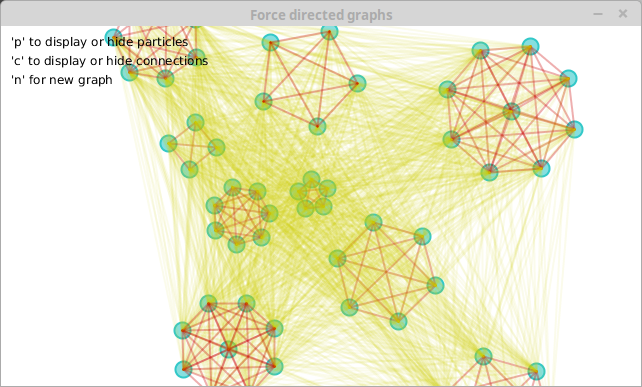
Using delegators in JRubyArt (where vanilla processing uses inner classes) and ruby-processing uses 'include Processing::Proxy' to mimic the same behaviour. See node.rb, where we selectively expose PApplets fill, stroke, stroke_weight and ellipse methods in the Node class.
force_directed_graph.rb
node.rb

force_directed_graph.rb
require 'jruby_art'
require 'toxiclibs'
require_relative 'cluster'
require_relative 'node'

#
# Copyright (c) 2010 Daniel Shiffman
#
# This demo & library is free software you can redistribute it and/or
# modify it under the terms of the GNU Lesser General Public
# License as published by the Free Software Foundation either
# version 2.1 of the License, or (at your option) any later version.
#
# http://creativecommons.org/licenses/LGPL/2.1/
#
# This library is distributed in the hope that it will be useful,
# but WITHOUT ANY WARRANTY without even the implied warranty of
# MERCHANTABILITY or FITNESS FOR A PARTICULAR PURPOSE.  See the GNU
# Lesser General Public License for more details.
#
# You should have received a copy of the GNU Lesser General Public
# License along with this library if not, write to the Free Software
# Foundation, Inc., 51 Franklin St, Fifth Floor, Boston, MA  02110-1301  USA
class ForceDirectedGraph < Processing::App
  attr_reader :physics, :clusters, :show_physics, :show_particles, :f

  def setup
    size(640, 360)
    @f = create_font('Georgia', 12, true)
    @show_physics = true
    @show_particles = true
    # Initialize the physics
    @physics = Physics::VerletPhysics2D.new
    physics.set_world_bounds(Toxi::Rect.new(10, 10, width - 20, height - 20))
    # Spawn a new random graph
    new_graph
  end

  # Spawn a new random graph
  def new_graph
    # Clear physics
    physics.clear
    center = TVec2D.new(width / 2, height / 2)
    @clusters = (0..8).map { Cluster.new(physics, rand(3..8), rand(20..100), center) }
    # All clusters connect to all clusters
    clusters.each_with_index do |ci, i|
      clusters[i + 1..clusters.size - 1].each do |cj|
        ci.connect(cj)
      end
    end
  end

  def draw
    # Update the physics world
    physics.update
    background(255)
    # Display all points
    clusters.each(&:display) if show_particles
    # If we want to see the physics
    if show_physics
      clusters.each_with_index do |ci, i|
        ci.internal_connections self
        # Cluster connections to other clusters
        clusters[1 + i..clusters.size - 1].each do |cj|
          ci.show_connections(self, cj)
        end
      end
    end
    # Instructions
    fill(0)
    text_font(f)
    text("'p' to display or hide particles\n'c' to display or hide connections\n'n' for new graph", 10, 20)
  end

  # Key press commands
  def key_pressed
    case key
    when 'c'
      @show_physics = !show_physics
      @show_particles = true unless show_physics
    when 'p'
      @show_particles = !show_particles
      @show_physics = true unless show_particles
    when 'n'
      new_graph
    end
  end
end

ForceDirectedGraph.new(title: 'Force directed graphs')
cluster.rb
#
# Copyright (c) 2010 Daniel Shiffman
#
# This demo & library is free software you can redistribute it and/or
# modify it under the terms of the GNU Lesser General Public
# License as published by the Free Software Foundation either
# version 2.1 of the License, or (at your option) any later version.
#
# http://creativecommons.org/licenses/LGPL/2.1/
#
# This library is distributed in the hope that it will be useful,
# but WITHOUT ANY WARRANTY without even the implied warranty of
# MERCHANTABILITY or FITNESS FOR A PARTICULAR PURPOSE.  See the GNU
# Lesser General Public License for more details.
#
# You should have received a copy of the GNU Lesser General Public
# License along with this library if not, write to the Free Software
# Foundation, Inc., 51 Franklin St, Fifth Floor, Boston, MA  02110-1301  USA
class Cluster
  attr_reader :nodes, :diameter, :physics

  # We initialize a with a number of nodes, a diameter, and centerpoint
  def initialize(physics, n, d, center)
    @physics = physics
    @diameter = d
    @nodes = (0..n).map { Node.new(center.add(TVec2D.random_vector)) }
    # Connect all the nodes with a Spring
    nodes[1..nodes.size - 1].each_with_index do |pi, i|
      nodes[0..i].each do |pj|
        physics.add_spring(Physics::VerletSpring2D.new(pi, pj, diameter, 0.01))
      end
    end
  end

  def display
    nodes.each(&:display)
  end
  # This functons connects one cluster to another
  # Each point of one cluster connects to each point of the other cluster
  # The connection is a "VerletMinDistanceSpring"
  # A VerletMinDistanceSpring is a spring which only enforces its rest length if the
  # current distance is less than its rest length. This is handy if you just want to
  # ensure objects are at least a certain distance from each other, but don't
  # care if it's bigger than the enforced minimum.

  def connect(other)
    other_nodes = other.nodes
    nodes.each do |pi|
      other_nodes.each do |pj|
        physics.add_spring(Physics::VerletMinDistanceSpring2D.new(pi, pj, (diameter + other.diameter) * 0.5, 0.05))
      end
    end
  end

  # Draw all the internal connections
  def internal_connections(app)
    app.stroke(200, 0, 0, 80)
    nodes[0..nodes.size - 1].each_with_index do |pi, i|
      nodes[i + 1..nodes.size - 1].each do |pj|
        app.line(pi.x, pi.y, pj.x, pj.y)
      end
    end
  end

  # Draw all the connections between this and another Cluster
  def show_connections(app, other)
    app.stroke(200, 200, 0, 20)
    app.stroke_weight(2)
    other_nodes = other.nodes
    nodes.each do |pi|
      other_nodes[0..other_nodes.size - 1].each do |pj|
        app.line(pi.x, pi.y, pj.x, pj.y)
      end
    end
  end
end
node.rb
require 'forwardable'

# The Nature of Code
# Daniel Shiffman
# http://natureofcode.com
# Force directed graph
# Heavily based on: http://code.google.com/p/fidgen/
# Notice how we are using inheritance here!
# We could have just stored a reference to a VerletParticle object
# inside the Node class, but inheritance is a nice alternative
class Node < Physics::VerletParticle2D
  extend Forwardable
  def_delegators(:@app, :fill, :stroke, :stroke_weight, :ellipse)
  def initialize(pos)
    super(pos)
    @app = $app
  end

  # All we're doing really is adding a display function to a VerletParticle
  def display
    fill(50, 200, 200, 150)
    stroke(50, 200, 200)
    stroke_weight(2)
    ellipse(x, y, 16, 16)
  end
end
Monday, 15 September 2014
Include Processing::Proxy to mimic the processing inner classes
If you have been using processing for some time, then you should be aware of the inner classes used by processing to make variables/methods available across classes (strictly non OOP but convenient).
In the processing ide, the use of java inner classes is hidden (because the code is post-processed). However if you look at the generated java you will find that if you create a class in the processing ide, it becomes an inner class. Use of the inner class is there to allow easy access to the methods and variables of the outer class (your sketch). If you graduated from using the processing ide to using Eclipse (see tutorial) or Netbeans (other ides are available) you will know that when you create a new java class you can't use the methods and variables, unless you call the instance of the PApplet from you sketch (typically a PApplet variable parent created in your new class, and the class constructor is used to initialize that variable). To give a similar level of access to that provided by processings inner classes you should include the ruby processing Processing::Proxy module in your sketches (however sketch width, and height are not available). The more 'pure' way to to provide such access is to copy the "Eclipse" way of accessing these variables and methods, and that is what you "should" do to access sketch width and height. The "dirty" way to do it is access the sketches '$app' global variable "width = $app.width" for example. A template for creating Processing::Proxy class (in a separate file) is included in ruby-processing:-
Of course you will give a different more relevant name to your inner classes!!
Then vim inner_class.rb, other editors are available
rp5 create inner_class --inner
Of course you will give a different more relevant name to your inner classes!!
Then vim inner_class.rb, other editors are available
class InnerClass
  include Processing::Proxy
end
Subscribe to:
Posts (Atom)
About Me

- monkstone
- I have developed JRubyArt and propane new versions of ruby-processing for JRuby-9.1.5.0 and processing-3.2.2