Thursday, 5 May 2011
Exploring modelX in ruby processing
############################
# processing modelX
# examples in ruby processing
###########################
def setup
size 500, 500, P3D
no_fill
end
def draw
background 0
push_matrix
# start at the middle of the screen
translate(width/2, height/2, -200)
# some pseudo random rotation to make things interesting
rotate_y 1.0 # yrot
rotate_z 2.0 # zrot
# rotate in X a little more each frame
rotate_x(frame_count / 100.0)
# offset from center
translate(0, 150, 0)
# draw a white box outline at (0, 0, 0)
stroke 255
box 80
# the box was drawn at (0, 0, 0), store that location
x = model_x(0, 0, 0)
y = model_y(0, 0, 0)
z = model_z(0, 0, 0)
# clear out all the transformations
pop_matrix
# draw another box at the same (x, y, z) coordinate as the other
push_matrix
translate(x, y, z)
stroke(255, 0, 0)
box 80
pop_matrix
end

Exploring screenX in ruby processing
I think there is a mistake in the version at the processing wiki (which I have flagged) because the 2D lines mentioned in the comments have six parameters (in my book that is 3D line even if Z is zero). You still get to see the parallax in my amended version, try it.
###################
# processing screenX example
# in ruby processing
###################
def setup
size 100, 100, P3D
end
def draw
background 204
x = mouse_x
y = mouse_y
z = -100
# Draw "X" at z = -100
stroke 255
line(x - 10, y - 10, z, x + 10, y + 10, z)
line(x + 10, y - 10, z, x - 10, y + 10, z)
# Draw line in 2D at same x value
# Notice the parallax
stroke 102
line(x, 0, x, height)
# Draw 2D line to match the x value
# element drawn at z = -100
stroke(0)
the_x = screen_x(x, y, z)
line(the_x, 0, the_x, height)
end
###################
# processing screenX example
# in ruby processing
###################
def setup
size 100, 100, P3D
end
def draw
background 204
x = mouse_x
y = mouse_y
z = -100
# Draw "X" at z = -100
stroke 255
line(x - 10, y - 10, z, x + 10, y + 10, z)
line(x + 10, y - 10, z, x - 10, y + 10, z)
# Draw line in 2D at same x value
# Notice the parallax
stroke 102
line(x, 0, x, height)
# Draw 2D line to match the x value
# element drawn at z = -100
stroke(0)
the_x = screen_x(x, y, z)
line(the_x, 0, the_x, height)
end
Tuesday, 3 May 2011
Winged Edge Mesh and Physics from Toxiclibs
Here is the toxiclibs InflateMesh verlet physics example demonstrating winged mesh class functionality. Although this was a P3D sketch in the example it looks best using OPENGL. Because there is still an issue with linux and ruby-processing OPENGL at less than full_screen, I have scaled some of the variables in the sketch (mainly annotated I think), anyway you should probably look at the original (included in the library download toxiclibs-complete version 0020).
# <p>This example uses the attraction behavior to inflate a 3D mesh.
# The mesh vertices are re-created as physics particles and connected
# using springs. Upon mouse press the inflation force is applied,
# counteracting the forces created by the springs, causing the mesh to
# expand and deform.</p>
#
# <p>Usage: Click and hold mouse button to inflate mesh</p>
#
############
# Copyright (c) 2010 Karsten Schmidt translated to ruby processing by Martin Prout (Spring 2011)
#
# This demo & library is free software you can redistribute it and/or
# modify it under the terms of the GNU Lesser General Public
# License as published by the Free Software Foundation either
# version 2.1 of the License, or (at your option) any later version.
#
# http:#creativecommons.org/licenses/LGPL/2.1/
#
# This library is distributed in the hope that it will be useful,
# but WITHOUT ANY WARRANTY without even the implied warranty of
# MERCHANTABILITY or FITNESS FOR A PARTICULAR PURPOSE. See the GNU
# Lesser General Public License for more details.
#
# You should have received a copy of the GNU Lesser General Public
# License along with this library if not, write to the Free Software
# Foundation, Inc., 51 Franklin St, Fifth Floor, Boston, MA 02110-1301 USA
#
class InflateMesh < Processing::App
load_libraries 'toxiclibs_p5', 'toxiclibscore', 'verletphysics', 'opengl'
include_package 'processing.opengl'
include_package 'toxi.geom'
include_package 'toxi.geom.mesh.subdiv'
include_package 'toxi.geom.mesh'
include_package 'toxi.physics'
include_package 'toxi.physics.behaviors'
include_package 'toxi.physics.constraints'
include_package 'toxi.processing'
attr_reader :physics, :inflate, :box, :gfx
full_screen
def setup
setup_opengl
@gfx = ToxiclibsSupport.new(self)
init_physics
end
def draw
@physics.update()
for vert in box.vertices.values
vert.set(physics.particles.get(vert.id))
end
box.center(nil) # nil means centre at 0, 0, 0
for vert in box.vertices.values
@physics.particles.get(vert.id).set(vert)
end
box.compute_face_normals
box.face_outwards
box.compute_vertex_normals
background(51)
translate(width / 2, height / 2, 0)
rotate_x((height / 2 - mouse_y) * 0.01)
rotate_y((width / 2 - mouse_x) * 0.01)
no_fill
lights
directional_light(255, 255, 255, -200, 1000, 500)
specular(255)
shininess(16)
@gfx.origin(Vec3D.new, 300) # scaled up axes display from 50
fill(192)
no_stroke
@gfx.mesh(box, true, 10) # scaled up normals display from 5
end
def init_physics
@box = WETriangleMesh.new
# create a simple start mesh
#box.add_mesh(Cone.new(Vec3D.new(0, 0, 0), Vec3D.new(0, 1, 0), 10, 50, 100).to_mesh(4))
@box.add_mesh(AABB.new(Vec3D.new, 150).to_mesh) # scaled up from 50
# then subdivide a few times...
@box.subdivide
@box.subdivide
@box.subdivide
@box.subdivide
@physics = VerletPhysics.new
@physics.set_world_bounds(AABB.new(Vec3D.new, 540)) # scaled up from 180
# turn mesh vertices into physics particles
for vert in box.vertices.values
@physics.add_particle(VerletParticle.new(vert))
end
# turn mesh edges into springs
for w_edge in box.edges.values
vp_a = physics.particles.get(w_edge.a.id)
vp_b = physics.particles.get(w_edge.b.id)
@physics.add_spring(VerletSpring.new(vp_a, vp_b, vp_a.distance_to(vp_b), 0.05))
end
end
def key_pressed # using a switch anticipating more key actions
case key
when 'i'
init_physics
when 's'
save_frame "inflate.png"
end
end
def mouse_pressed
@inflate=AttractionBehavior.new(Vec3D.new, 400, -0.3, 0.001)
@physics.add_behavior(inflate)
end
def mouse_released
@physics.remove_behavior(inflate)
end
def setup_opengl
render_mode OPENGL
hint ENABLE_OPENGL_4X_SMOOTH # optional
hint DISABLE_OPENGL_ERROR_REPORT # optional
end
end

# <p>This example uses the attraction behavior to inflate a 3D mesh.
# The mesh vertices are re-created as physics particles and connected
# using springs. Upon mouse press the inflation force is applied,
# counteracting the forces created by the springs, causing the mesh to
# expand and deform.</p>
#
# <p>Usage: Click and hold mouse button to inflate mesh</p>
#
############
# Copyright (c) 2010 Karsten Schmidt translated to ruby processing by Martin Prout (Spring 2011)
#
# This demo & library is free software you can redistribute it and/or
# modify it under the terms of the GNU Lesser General Public
# License as published by the Free Software Foundation either
# version 2.1 of the License, or (at your option) any later version.
#
# http:#creativecommons.org/licenses/LGPL/2.1/
#
# This library is distributed in the hope that it will be useful,
# but WITHOUT ANY WARRANTY without even the implied warranty of
# MERCHANTABILITY or FITNESS FOR A PARTICULAR PURPOSE. See the GNU
# Lesser General Public License for more details.
#
# You should have received a copy of the GNU Lesser General Public
# License along with this library if not, write to the Free Software
# Foundation, Inc., 51 Franklin St, Fifth Floor, Boston, MA 02110-1301 USA
#
class InflateMesh < Processing::App
load_libraries 'toxiclibs_p5', 'toxiclibscore', 'verletphysics', 'opengl'
include_package 'processing.opengl'
include_package 'toxi.geom'
include_package 'toxi.geom.mesh.subdiv'
include_package 'toxi.geom.mesh'
include_package 'toxi.physics'
include_package 'toxi.physics.behaviors'
include_package 'toxi.physics.constraints'
include_package 'toxi.processing'
attr_reader :physics, :inflate, :box, :gfx
full_screen
def setup
setup_opengl
@gfx = ToxiclibsSupport.new(self)
init_physics
end
def draw
@physics.update()
for vert in box.vertices.values
vert.set(physics.particles.get(vert.id))
end
box.center(nil) # nil means centre at 0, 0, 0
for vert in box.vertices.values
@physics.particles.get(vert.id).set(vert)
end
box.compute_face_normals
box.face_outwards
box.compute_vertex_normals
background(51)
translate(width / 2, height / 2, 0)
rotate_x((height / 2 - mouse_y) * 0.01)
rotate_y((width / 2 - mouse_x) * 0.01)
no_fill
lights
directional_light(255, 255, 255, -200, 1000, 500)
specular(255)
shininess(16)
@gfx.origin(Vec3D.new, 300) # scaled up axes display from 50
fill(192)
no_stroke
@gfx.mesh(box, true, 10) # scaled up normals display from 5
end
def init_physics
@box = WETriangleMesh.new
# create a simple start mesh
#box.add_mesh(Cone.new(Vec3D.new(0, 0, 0), Vec3D.new(0, 1, 0), 10, 50, 100).to_mesh(4))
@box.add_mesh(AABB.new(Vec3D.new, 150).to_mesh) # scaled up from 50
# then subdivide a few times...
@box.subdivide
@box.subdivide
@box.subdivide
@box.subdivide
@physics = VerletPhysics.new
@physics.set_world_bounds(AABB.new(Vec3D.new, 540)) # scaled up from 180
# turn mesh vertices into physics particles
for vert in box.vertices.values
@physics.add_particle(VerletParticle.new(vert))
end
# turn mesh edges into springs
for w_edge in box.edges.values
vp_a = physics.particles.get(w_edge.a.id)
vp_b = physics.particles.get(w_edge.b.id)
@physics.add_spring(VerletSpring.new(vp_a, vp_b, vp_a.distance_to(vp_b), 0.05))
end
end
def key_pressed # using a switch anticipating more key actions
case key
when 'i'
init_physics
when 's'
save_frame "inflate.png"
end
end
def mouse_pressed
@inflate=AttractionBehavior.new(Vec3D.new, 400, -0.3, 0.001)
@physics.add_behavior(inflate)
end
def mouse_released
@physics.remove_behavior(inflate)
end
def setup_opengl
render_mode OPENGL
hint ENABLE_OPENGL_4X_SMOOTH # optional
hint DISABLE_OPENGL_ERROR_REPORT # optional
end
end

Monday, 2 May 2011
Using Hemesh Library in ruby-processing
It has been positively ages since I last posted any ruby-processing sketches here is one processing library that you might like to experiment with it is the Hemesh library by Frederik Vanhoutte aka W:Blut. Over on my other blog I have been describing the development of my latest processing library "povwriter" a tool for exporting processing sketches to the povray format and this is one of the sketches I have used. Next I will attempt to get my "povwriter" library working in ruby processing.
# RandomCage.rb is a processing sketch that shows
# how you can use the Hemesh library in Ruby-Processing.
class RandomCage < Processing::App
load_libraries 'hemesh', 'opengl'
include_package 'wblut.hemesh'
include_package 'wblut.hemesh.creators'
include_package 'wblut.hemesh.iterators'
include_package 'wblut.hemesh.modifiers'
include_package 'wblut.hemesh.subdividors'
import "processing.opengl"
full_screen
TWO_PI = Math::PI * 2
attr_reader :cage
def setup
configure_opengl
@cage = HE_Mesh.new(HEC_Box.new(self).set_depth(height/2).set_height(height/2).set_width(height/2))
@cage.modify(HEM_ChamferCorners.new.set_distance(height*0.1))
#HES_Planar() subdivision can include a measure of randomness
@cage.subdivide(HES_Planar.new.set_random(true).set_range(0.4),2)
#A save choice after introducing any kind of randomness is to triangulate possible concave faces.
#Concave faces do not invalidate the mesh but can give unexpected results.
@cage.triangulate_concave_faces()
@cage.modify(HEM_Lattice.new.set_depth(0.016*height).set_width(0.016*height).set_fuse(true))
sel = HE_Selection.new
for f in cage.f_itr # using ruby syntax here
sel.add f
end
cage.subdivide_selected(HES_CatmullClark.new(),sel,2)
end
def draw
background(120)
lights
translate(width/2, height/2)
rotate_y(mouse_x * 1.0 / width * TWO_PI - Math::PI)
rotate_x(mouse_y * 1.0 / height * TWO_PI - Math::PI)
fill(255)
no_stroke
cage.draw_faces
stroke(0)
cage.draw_edges
end
def configure_opengl
render_mode OPENGL
hint ENABLE_OPENGL_4X_SMOOTH # optional
hint DISABLE_OPENGL_ERROR_REPORT # optional
end
end

# RandomCage.rb is a processing sketch that shows
# how you can use the Hemesh library in Ruby-Processing.
class RandomCage < Processing::App
load_libraries 'hemesh', 'opengl'
include_package 'wblut.hemesh'
include_package 'wblut.hemesh.creators'
include_package 'wblut.hemesh.iterators'
include_package 'wblut.hemesh.modifiers'
include_package 'wblut.hemesh.subdividors'
import "processing.opengl"
full_screen
TWO_PI = Math::PI * 2
attr_reader :cage
def setup
configure_opengl
@cage = HE_Mesh.new(HEC_Box.new(self).set_depth(height/2).set_height(height/2).set_width(height/2))
@cage.modify(HEM_ChamferCorners.new.set_distance(height*0.1))
#HES_Planar() subdivision can include a measure of randomness
@cage.subdivide(HES_Planar.new.set_random(true).set_range(0.4),2)
#A save choice after introducing any kind of randomness is to triangulate possible concave faces.
#Concave faces do not invalidate the mesh but can give unexpected results.
@cage.triangulate_concave_faces()
@cage.modify(HEM_Lattice.new.set_depth(0.016*height).set_width(0.016*height).set_fuse(true))
sel = HE_Selection.new
for f in cage.f_itr # using ruby syntax here
sel.add f
end
cage.subdivide_selected(HES_CatmullClark.new(),sel,2)
end
def draw
background(120)
lights
translate(width/2, height/2)
rotate_y(mouse_x * 1.0 / width * TWO_PI - Math::PI)
rotate_x(mouse_y * 1.0 / height * TWO_PI - Math::PI)
fill(255)
no_stroke
cage.draw_faces
stroke(0)
cage.draw_edges
end
def configure_opengl
render_mode OPENGL
hint ENABLE_OPENGL_4X_SMOOTH # optional
hint DISABLE_OPENGL_ERROR_REPORT # optional
end
end

Thursday, 3 March 2011
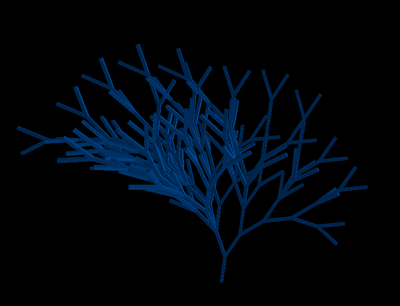
The 'growing' of a context-sensitive L-system plant (ruby-processing)
LSystem rules from a paper by Tong Lin at UMBC Maryland. The following code could be simplified if you could rely on string index being a char (ruby 1.9) rather than ascii value (ruby 1.8), tripped me up at first, ruby-processing is still at 1.8 (it depends on JRuby which will start supporting ruby 1.9 from JRuby version 1.6?)
Update 10 March 2011 just tried jruby-complete-1.6-RC3 still get old behaviour ie ascii value rather than char when indexing a string, nor is ord method supported still requires Jeremys shim to string.
########################################################
# cs_test.rb
# A 3D Plant implemented using a Context Sensitive
# Lindenmayer System in ruby-processing
# by Martin Prout (3 March 2011)
########################################################
class CS_Test < Processing::App
full_screen # NB: All distances are relative to screen height
load_libraries 'csplant', 'PeasyCam', 'opengl'
import 'peasy'
import "processing.opengl" if library_loaded? "opengl"
attr_reader :csplant, :cam
def setup
library_loaded?(:opengl) ? configure_opengl : render_mode(P3D)
configure_peasycam
@csplant = CSPlant.new(height)
csplant.create_grammar 5
no_stroke
end
def configure_peasycam
cam = PeasyCam.new self, height / 6.5
cam.set_minimum_distance height / 10
cam.set_maximum_distance height
end
def configure_opengl
render_mode OPENGL
hint ENABLE_OPENGL_4X_SMOOTH # optional
hint DISABLE_OPENGL_ERROR_REPORT # optional
end
def draw
background 0
lights
csplant.render
end
end
The PeasyCam and csplant libraries need to be nested in the usual way in a library folder. This code is much more complicated than my previous post. This is mainly due to the need to ignore certain symbols when determining context, and hence need to navigate along the production string.
######################################
# csplant.rb
# A library used to implement
# a context sensitive
# 1-L lsystem grammar in
# ruby-processing
# by Martin Prout (4 March 2011)
######################################
################################################
# A helper class stores cs prefix idx, and cchar
# uses idx and char to determine context and
# pre to access context sensitive rule from rules
###############################################
class CSRule
attr_accessor :pre
def initialize pre
@pre = pre
end
def idx
x = 0
if (pre[1] == 60) # NB comparing ascii values until ruby 1.9 support
x -= 1
end
if (pre[1] == 62) # ">"[0] = 62, "<"[0] = 60
x += 1
end
return x
end
def cchar
return pre[0]
end
end
##################################
# The grammar class stores lsystem rules
# in rules Hash, and context Hash if applicable
# In production context is checked (and applied)
# using get_rule method
##################################
class CSGrammar
IGNORE = "[]+-^&3" # characters to ignore for context as a constant string
attr_reader :axiom, :context, :rules, :count
def initialize(axiom)
@axiom = axiom
@rules = Hash.new
@context = Hash.new
end
def add_rule(pre, rule)
if pre.length == 3
context.store(pre[2], CSRule.new(pre))
end
rules.store pre, rule
end
def generate(repeat = 0) # repeat iteration grammar rules
prod = axiom
repeat.times do
prod = new_production(prod)
end
return prod
end
def new_production prod # single iteration grammar rules
@count = 0 # initialise count on axiom or new prod
prod.gsub!(/./) do |ch|
get_rule(prod, ch)
end
end
def get_rule prod, ch
rule = ch # default is to return original character as rule (ie no change)
idx = count # idx is a local index, used to navigate the production string
if (context.has_key?(ch[0]))
while IGNORE.include?(prod[context[ch[0]].idx + idx].chr)
idx += context[ch[0]].idx
end
if prod[context[ch[0]].idx + idx] == context[ch[0]].cchar
rule = rules[context[ch[0]].pre]
else
rule = rules[ch] if rules.has_key?(ch) # context free rule if it exists
end
else
rule = rules[ch] if rules.has_key?(ch) # context free rule if it exists
end
@count += 1 # increment the index of axiom/production as a side effect
return rule
end
end
############
# CSPlant
############
class CSPlant
include Processing::Proxy
attr_reader :grammar, :axiom, :production, :premis, :rule,
:theta, :scale_factor, :distance, :phi, :len
def initialize(len)
@axiom = "F"
@grammar = CSGrammar.new(axiom)
@production = axiom
@len = len
@distance = len/4 # distance value relative to screen height
@theta = Math::PI/180 * 25
@phi = Math::PI/180 * 25
grammar.add_rule("F", "F[-EF[3&A]]E[+F[3^A]]")
grammar.add_rule("F<E", "F[&F[3+A]][^F[3-A]]") # context sensitive rule
no_stroke()
end
def render()
fill(0, 75, 152)
light_specular(204, 204, 204)
specular(255, 255, 255)
shininess(1.0)
repeat = 1
production.scan(/./) do |ch|
case(ch)
when "F"
translate(0, distance/-2, 0)
box(distance/9, distance, distance/9)
translate(0, distance/-2, 0)
when "+"
rotateX(-theta * repeat)
repeat = 1
when "-"
rotateX(theta * repeat)
repeat = 1
when "&"
rotateZ(-phi * repeat)
repeat = 1
when "^"
rotateZ(phi * repeat)
repeat = 1
when "3"
repeat = 3
when "["
push_matrix
when "]"
pop_matrix
when "E", "A"
else
puts("character '#{ch}' not in grammar")
end
end
end
##############################
# create grammar from axiom and
# rules (adjust scale)
##############################
def create_grammar(gen)
@distance *= 0.5**gen
@production = grammar.generate gen
end
end
Update 10 March 2011 just tried jruby-complete-1.6-RC3 still get old behaviour ie ascii value rather than char when indexing a string, nor is ord method supported still requires Jeremys shim to string.
########################################################
# cs_test.rb
# A 3D Plant implemented using a Context Sensitive
# Lindenmayer System in ruby-processing
# by Martin Prout (3 March 2011)
########################################################
class CS_Test < Processing::App
full_screen # NB: All distances are relative to screen height
load_libraries 'csplant', 'PeasyCam', 'opengl'
import 'peasy'
import "processing.opengl" if library_loaded? "opengl"
attr_reader :csplant, :cam
def setup
library_loaded?(:opengl) ? configure_opengl : render_mode(P3D)
configure_peasycam
@csplant = CSPlant.new(height)
csplant.create_grammar 5
no_stroke
end
def configure_peasycam
cam = PeasyCam.new self, height / 6.5
cam.set_minimum_distance height / 10
cam.set_maximum_distance height
end
def configure_opengl
render_mode OPENGL
hint ENABLE_OPENGL_4X_SMOOTH # optional
hint DISABLE_OPENGL_ERROR_REPORT # optional
end
def draw
background 0
lights
csplant.render
end
end
The PeasyCam and csplant libraries need to be nested in the usual way in a library folder. This code is much more complicated than my previous post. This is mainly due to the need to ignore certain symbols when determining context, and hence need to navigate along the production string.
######################################
# csplant.rb
# A library used to implement
# a context sensitive
# 1-L lsystem grammar in
# ruby-processing
# by Martin Prout (4 March 2011)
######################################
################################################
# A helper class stores cs prefix idx, and cchar
# uses idx and char to determine context and
# pre to access context sensitive rule from rules
###############################################
class CSRule
attr_accessor :pre
def initialize pre
@pre = pre
end
def idx
x = 0
if (pre[1] == 60) # NB comparing ascii values until ruby 1.9 support
x -= 1
end
if (pre[1] == 62) # ">"[0] = 62, "<"[0] = 60
x += 1
end
return x
end
def cchar
return pre[0]
end
end
##################################
# The grammar class stores lsystem rules
# in rules Hash, and context Hash if applicable
# In production context is checked (and applied)
# using get_rule method
##################################
class CSGrammar
IGNORE = "[]+-^&3" # characters to ignore for context as a constant string
attr_reader :axiom, :context, :rules, :count
def initialize(axiom)
@axiom = axiom
@rules = Hash.new
@context = Hash.new
end
def add_rule(pre, rule)
if pre.length == 3
context.store(pre[2], CSRule.new(pre))
end
rules.store pre, rule
end
def generate(repeat = 0) # repeat iteration grammar rules
prod = axiom
repeat.times do
prod = new_production(prod)
end
return prod
end
def new_production prod # single iteration grammar rules
@count = 0 # initialise count on axiom or new prod
prod.gsub!(/./) do |ch|
get_rule(prod, ch)
end
end
def get_rule prod, ch
rule = ch # default is to return original character as rule (ie no change)
idx = count # idx is a local index, used to navigate the production string
if (context.has_key?(ch[0]))
while IGNORE.include?(prod[context[ch[0]].idx + idx].chr)
idx += context[ch[0]].idx
end
if prod[context[ch[0]].idx + idx] == context[ch[0]].cchar
rule = rules[context[ch[0]].pre]
else
rule = rules[ch] if rules.has_key?(ch) # context free rule if it exists
end
else
rule = rules[ch] if rules.has_key?(ch) # context free rule if it exists
end
@count += 1 # increment the index of axiom/production as a side effect
return rule
end
end
############
# CSPlant
############
class CSPlant
include Processing::Proxy
attr_reader :grammar, :axiom, :production, :premis, :rule,
:theta, :scale_factor, :distance, :phi, :len
def initialize(len)
@axiom = "F"
@grammar = CSGrammar.new(axiom)
@production = axiom
@len = len
@distance = len/4 # distance value relative to screen height
@theta = Math::PI/180 * 25
@phi = Math::PI/180 * 25
grammar.add_rule("F", "F[-EF[3&A]]E[+F[3^A]]")
grammar.add_rule("F<E", "F[&F[3+A]][^F[3-A]]") # context sensitive rule
no_stroke()
end
def render()
fill(0, 75, 152)
light_specular(204, 204, 204)
specular(255, 255, 255)
shininess(1.0)
repeat = 1
production.scan(/./) do |ch|
case(ch)
when "F"
translate(0, distance/-2, 0)
box(distance/9, distance, distance/9)
translate(0, distance/-2, 0)
when "+"
rotateX(-theta * repeat)
repeat = 1
when "-"
rotateX(theta * repeat)
repeat = 1
when "&"
rotateZ(-phi * repeat)
repeat = 1
when "^"
rotateZ(phi * repeat)
repeat = 1
when "3"
repeat = 3
when "["
push_matrix
when "]"
pop_matrix
when "E", "A"
else
puts("character '#{ch}' not in grammar")
end
end
end
##############################
# create grammar from axiom and
# rules (adjust scale)
##############################
def create_grammar(gen)
@distance *= 0.5**gen
@production = grammar.generate gen
end
end

Tuesday, 1 March 2011
Exploring Context Sensitive LSystem rules in ruby / ruby-processing
Warning the following code depends on ruby 1.9, where string index returns a char rather than an ascii value (ruby 1.8) see following post for how this tripped me up at first when exploring a proper ruby-processing example. (Update 5 March 2011)
######################################
# cs_grammar.rb a context sensitive
# 1-L lsystem grammar for
# ruby/ruby-processing
# by Martin Prout (1 March 2011)
######################################
#######################
# A helper class stores
# cs rules idx, and cchar
# methods extract cs data
#######################
class CSRule
attr_accessor :pre, :crule
def initialize pre, crule
@pre, @crule = pre, crule
end
def idx
x = 0
if (pre[1] == "<")
x -= 2
end
return x
end
def cchar
return pre[0]
end
end
##################################
# The grammar class stores rules
# in two Hashes, one for cs rules,
# one for context free rules. Rules
# are filtered on input, and context
# is checked using get_rule in production
##################################
class CSGrammar
attr_reader :axiom, :context, :no_context, :idx
def initialize(axiom)
@axiom = axiom
@no_context = Hash.new
@context = Hash.new
end
def add_rule(pre, rule)
case pre.length
when 3
@context.store(pre[2], CSRule.new(pre, rule)) # index, context, rule
when 1
@no_context.store pre, rule
else print "unrecognized grammar '#{pre}'"
end
end
def generate(repeat = 0) # repeat iteration grammar rules
prod = axiom
repeat.times do
prod = new_production(prod)
end
return prod
end
def new_production prod # single iteration grammar rules
@idx = 0
prod.gsub!(/./) do |ch|
get_rule(prod, ch)
end
end
def get_rule prod, ch
rule = ch # default is return original character as rule (no change)
@idx += 1 # increment the index of axiom/production as a side effect
if (context.has_key?(ch)) && (prod[context[ch].idx + idx] == context[ch].cchar)
rule = context[ch].crule # use context sensitive rule
else
rule = no_context[ch] if no_context.has_key?(ch) # context free rule if it exists
end
return rule
end
end
# Test data taken from ABOP
7.times do |i|
grammar = CSGrammar.new("baaaaaa")
grammar.add_rule("b<a", "b") # context sensitive rule replace a when preceded by b
grammar.add_rule("b", "a")
result = grammar.generate(i)
print result << "\n"
end
Note the way b 'travels' from left to right through the production string in the test output.
Reference:
The Algorithmic Beauty of Plants
Przemyslaw Prusinkiewicz
Aristid Lindenmayer
######################################
# cs_grammar.rb a context sensitive
# 1-L lsystem grammar for
# ruby/ruby-processing
# by Martin Prout (1 March 2011)
######################################
#######################
# A helper class stores
# cs rules idx, and cchar
# methods extract cs data
#######################
class CSRule
attr_accessor :pre, :crule
def initialize pre, crule
@pre, @crule = pre, crule
end
def idx
x = 0
if (pre[1] == "<")
x -= 2
end
return x
end
def cchar
return pre[0]
end
end
##################################
# The grammar class stores rules
# in two Hashes, one for cs rules,
# one for context free rules. Rules
# are filtered on input, and context
# is checked using get_rule in production
##################################
class CSGrammar
attr_reader :axiom, :context, :no_context, :idx
def initialize(axiom)
@axiom = axiom
@no_context = Hash.new
@context = Hash.new
end
def add_rule(pre, rule)
case pre.length
when 3
@context.store(pre[2], CSRule.new(pre, rule)) # index, context, rule
when 1
@no_context.store pre, rule
else print "unrecognized grammar '#{pre}'"
end
end
def generate(repeat = 0) # repeat iteration grammar rules
prod = axiom
repeat.times do
prod = new_production(prod)
end
return prod
end
def new_production prod # single iteration grammar rules
@idx = 0
prod.gsub!(/./) do |ch|
get_rule(prod, ch)
end
end
def get_rule prod, ch
rule = ch # default is return original character as rule (no change)
@idx += 1 # increment the index of axiom/production as a side effect
if (context.has_key?(ch)) && (prod[context[ch].idx + idx] == context[ch].cchar)
rule = context[ch].crule # use context sensitive rule
else
rule = no_context[ch] if no_context.has_key?(ch) # context free rule if it exists
end
return rule
end
end
# Test data taken from ABOP
7.times do |i|
grammar = CSGrammar.new("baaaaaa")
grammar.add_rule("b<a", "b") # context sensitive rule replace a when preceded by b
grammar.add_rule("b", "a")
result = grammar.generate(i)
print result << "\n"
end
Test Output:

baaaaaa
abaaaaa
aabaaaa
aaabaaa
aaaabaa
aaaaaba
aaaaaab
Note the way b 'travels' from left to right through the production string in the test output.
Reference:
The Algorithmic Beauty of Plants
Przemyslaw Prusinkiewicz
Aristid Lindenmayer
Friday, 21 January 2011
Accelerating java2d sketches in ruby processing
Graphics acceleration of java2d is apparently turned off by default. To enable it add the following to java_args.txt in the data folder (of the sketch you wish to accelerate).
This article is only of interest if you've got a decent graphics card and are not using software emulated graphics acceleration (eg mesa on linux). Doesn't seem to play well with control panel sketches such as jwishy.
-Dsun.java2d.opengl=true (use True instead for verbose output informs you that the graphics pipeline is open)
Which sketches will benefit from such acceleration could be determined empirically, although this article gives some guidance. I was alerted to this information by one of phi.lho responses (on the processing discussion board) to a query about relative speed of some sketches on Windows and Ubuntu (which were different Ubuntu slower, until the use of this java option).
This article is only of interest if you've got a decent graphics card and are not using software emulated graphics acceleration (eg mesa on linux). Doesn't seem to play well with control panel sketches such as jwishy.
Subscribe to:
Comments (Atom)
About Me

- monkstone
- I have developed JRubyArt and propane new versions of ruby-processing for JRuby-9.1.5.0 and processing-3.2.2