Experiments with ruby-processing (processing-2.2.1) and JRubyArt for processing-3.0

Showing posts with label backpropagation. Show all posts

Saturday, 15 March 2014

A gui for ai4r shape recognition in ruby

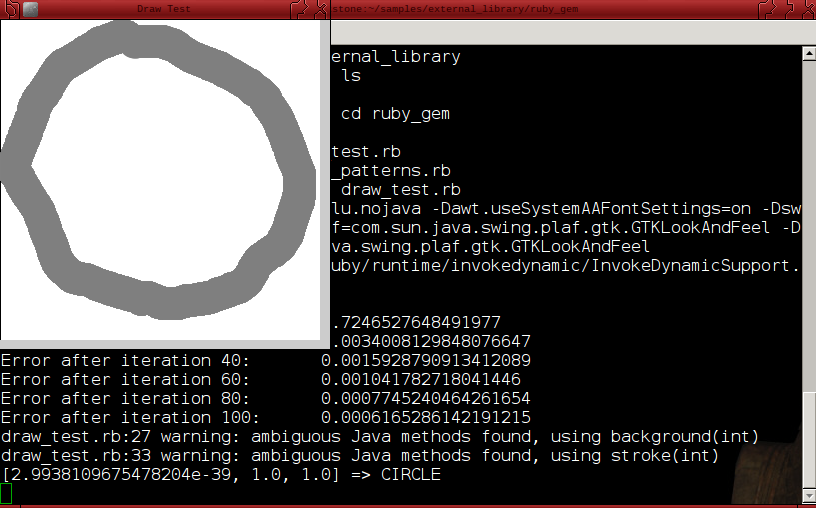
Here I use ruby-processings control_panel to create a gui for my shape recognition, which can load custom shapes (drawn in processing) or pre-built test data (see CROSS_WITH_NOISE below). See OCRExample here to learn more.
#####################################################################
# Using the ai4r gem in ruby-processing.
# A simple example that demonstrates using
# a backpropagation neural network. Use the drop box menu to
# select a prebuilt shape. To draw a test shape tick drawing checkbox,
# release the mouse when drawing a discontinous shape eg cross.
# Clear the sketch with clear button. 
# Press evaluate and result is printed to the console....
####################################################################

require 'ai4r'
load_library :vecmath, :control_panel
require_relative 'training_patterns.rb'

attr_reader :img, :img_pixels, :ci_input, :cr_input, :tr_input, :sq_input, :net, :points, :panel, :hide, :drawing

def setup
  size(320, 320)
  control_panel do |c|
    c.title = "control"
    c.look_feel "Nimbus"
    c.checkbox  :drawing
    c.button    :clear
    c.button    :evaluate
    c.menu      :shape, ['CIRCLE', 'CROSS', 'CROSS_WITH_NOISE', 'SQUARE', 'TRIANGLE', 'DEFAULT']
    @panel = c
  end
  @hide = false
  @points = []
  srand 1
  @net = Ai4r::NeuralNetwork::Backpropagation.new([256, 3])
  @ci_input = CIRCLE.flatten.collect { |input| input.to_f / 127.0}
  @tr_input = TRIANGLE.flatten.collect { |input| input.to_f / 127.0}
  @sq_input = SQUARE.flatten.collect { |input| input.to_f / 127.0}
  @cr_input = CROSS.flatten.collect { |input| input.to_f / 127.0}
  train
  background 255
end


def draw
  # only make control_panel visible once, or again when hide is false
  unless hide
    @hide = true
    panel.set_visible(hide)
  end
  if drawing
    stroke_weight 32
    stroke 127
    points.each_cons(2) { |ps, pe| line ps.x, ps.y, pe.x, pe.y}
  else
    no_fill
    stroke_weight(32)
    stroke(127)
    case @shape
    when 'CIRCLE'
      background(255)
      draw_circle
      @shape = 'DEFAULT'
    when 'CROSS'
      background(255)
      draw_cross
      @shape = 'DEFAULT'
    when 'CROSS_WITH_NOISE'
      background(255)
      draw_shape CROSS_WITH_NOISE
      @shape = 'DEFAULT'
    when 'SQUARE'
      background(255)
      draw_square
      @shape = 'DEFAULT'
    when 'TRIANGLE'
      background(255)
      draw_triangle
      @shape = 'DEFAULT'
    end
  end
end

def draw_shape shape
  background(255)
  no_stroke
  (0  ... width / 20).each do |i|
    (0  ... height / 20).each do |j|
      col = 255 - shape[i][j]
      fill(col)
      rect(i * 20, j * 20,  20,  20)
    end
  end
end

def train
  puts "Training Network Please Wait"
  101.times do |i|
    error = net.train(tr_input, [1.0, 0, 0])
    error = net.train(sq_input, [0, 1.0, 0])
    error = net.train(cr_input, [0, 0, 1.0])
    error = net.train(ci_input, [0, 1.0, 1.0])
    puts "Error after iteration #{i}:\t#{format("%.5f", error)}" if i%20 == 0
  end
end

def result_label(result)
  if result.inject(0, :+).between?(1.9, 2.1)
    if result[0] < 0.01 && result[1].between?(0.99, 1.0) && result[2].between?(0.99, 1.0)
      return "CIRCLE"
    else
      return "UNKNOWN"
    end
  elsif result.inject(0, :+).between?(0.95, 1.1)
    if result[0].between?(0.95, 1.0) && (result[1] + result[2]) < 0.01
      return "TRIANGLE"
    elsif result[1].between?(0.95, 1.0) && (result[0] + result[2]) < 0.01
      return "SQUARE"
    elsif result[2].between?(0.95, 1.0) && (result[1] + result[0]) < 0.01
      return "CROSS"
    else
      return "UNKNOWN"
    end
  end
  return "UNKNOWN"
end

def mouse_dragged
  points << Vec2D.new(mouse_x, mouse_y)
end

def mouse_released
  points.clear
end

def draw_circle
  ellipse(width / 2, height / 2, 320 - 32, 320 - 32)
end

def draw_square
  rect(16, 16, 320 - 32, 320 - 32)
end

def draw_cross
  line(width / 2, 0, width / 2, 320)
  line(0, height / 2,  320 , height / 2)
end

def draw_triangle
  triangle(width / 2, 32, 24, height - 16,  width - 24, height - 16)
end

def clear
  background 255
end

def evaluate
  load_pixels
  img_pixels = []
  (0...height).step(20) do |y|
    row = []
    (0...width).step(20) do |x|
      row << 255 - brightness(pixels[(y + 10) * width + x + 10])
    end
    img_pixels << row
  end
  puts "#{net.eval(img_pixels.flatten).inspect} => #{result_label(net.eval(img_pixels.flatten))}"
end

Friday, 14 March 2014

Pattern recognition using the ai4r gem in ruby-processing

##################################################
# Using the ai4r gem in ruby-processing.
# A simple example that demonstrates using
# a backpropagation neural network. Draw a
# shape and press 'e' or 'E' to evaluate it.
# Clear the sketch with 'c' or 'C'. Release
# mouse when drawing discontinous shape eg cross.
# Result is printed to console....
##################################################

require 'ai4r'
load_library :vecmath
require_relative 'training_patterns.rb'

attr_reader :img, :img_pixels, :ci_input, :cr_input, :tr_input, :sq_input, :net, :points

def setup
  size(320, 320)
  @points = []
  srand 1
  @net = Ai4r::NeuralNetwork::Backpropagation.new([256, 3])
  @tr_input = TRIANGLE.flatten.collect { |input| input.to_f / 127.0}
  @sq_input = SQUARE.flatten.collect { |input| input.to_f / 127.0}
  @cr_input = CROSS.flatten.collect { |input| input.to_f / 127.0}
  @ci_input = CIRCLE.flatten.collect { |input| input.to_f / 127.0}
  train
  background 255
end


def draw
  stroke_weight 32
  stroke 127
  points.each_cons(2) { |ps, pe| line ps.x, ps.y, pe.x, pe.y}
end

def train
  puts "Training Network Please Wait"
  101.times do |i|
    error = net.train(tr_input, [1.0, 0, 0])
    error = net.train(sq_input, [0, 1.0, 0])
    error = net.train(cr_input, [0, 0, 1.0])
    error = net.train(ci_input, [0, 1.0, 1.0])
    puts "Error after iteration #{i}:\t#{error}" if i%20 == 0
  end
end

def result_label(result)
  if result.inject(0, :+) > 1.9
    if result[0] < result[1] && result[0] < result[2]
      return "CIRCLE"
    else
      return "UNKNOWN"
    end
  elsif result[0] > result[1] && result[0] > result[2]
    return "TRIANGLE"
  elsif result[1] > result[2]
    return "SQUARE"
  elsif result[2] > result[0] && result[2] > result[1]
    return "CROSS"
  else
    return "UNKNOWN"
  end
end

def mouse_dragged
  points << Vec2D.new(mouse_x, mouse_y)
end

def mouse_released
  points.clear
end

def key_pressed
  case key
  when 'e', 'E' # load pixels and evaluate shape
   load_pixels
   img_pixels = []
   (0...height).step(20) do |y|
    row = []
    (0...width).step(20) do |x|
     row << 255 - brightness(pixels[(y + 10) * width + x + 10])
    end
    img_pixels << row
   end
   puts "#{net.eval(img_pixels.flatten).inspect} => #{result_label(net.eval(img_pixels.flatten))}"
  when 'c', 'C'
   background 255
  end
end

The training data
# Training data  
# training_patterns.rb
#

TRIANGLE = [
  [ 0,  0,  0,  0,  0,  0,  0, 127, 127,  0,  0,  0,  0,  0,  0,  0],
  [ 0,  0,  0,  0,  0,  0, 25,  229,  229, 25,  0,  0,  0,  0,  0,  0],
  [ 0,  0,  0,  0,  0,  0, 127, 127, 127, 127,  0,  0,  0,  0,  0,  0],
  [ 0,  0,  0,  0,  0, 25,  229, 25, 25,  229, 25,  0,  0,  0,  0,  0],
  [ 0,  0,  0,  0,  0, 127, 127,  0,  0, 127, 127,  0,  0,  0,  0,  0],
  [ 0,  0,  0,  0, 25,  229, 25,  0,  0, 25,  229, 25,  0,  0,  0,  0],
  [ 0,  0,  0,  0, 127, 127,  0,  0,  0,  0, 127, 127,  0,  0,  0,  0],
  [ 0,  0,  0, 25,  229, 25,  0,  0,  0,  0, 25,  229, 25,  0,  0,  0],
  [ 0,  0,  0, 127, 127,  0,  0,  0,  0,  0,  0, 127, 127,  0,  0,  0],
  [ 0,  0, 25,  229, 25,  0,  0,  0,  0,  0,  0, 25,  229, 25,  0,  0],
  [ 0,  0, 127, 127,  0,  0,  0,  0,  0,  0,  0,  0, 127, 127,  0,  0],
  [ 0, 25,  229, 25,  0,  0,  0,  0,  0,  0,  0,  0, 25,  229, 25,  0],
  [ 0, 127, 127,  0,  0,  0,  0,  0,  0,  0,  0,  0,  0, 127, 127,  0],
  [25,  229, 25,  0,  0,  0,  0,  0,  0,  0,  0,  0,  0, 25,  229, 25],
  [127, 127,  0,  0,  0,  0,  0,  0,  0,  0,  0,  0,  0,  0, 127, 127],
  [255, 255, 255, 255, 255, 255, 255, 255, 255, 255, 255, 255, 255, 255, 255, 255]
]

SQUARE = [
  [255, 255, 255, 255, 255, 255, 255, 255, 255, 255, 255, 255, 255, 255, 255, 255],
  [255,  0,  0,  0,  0,  0,  0,  0,  0,  0,  0,  0,  0,  0,  0, 255],
  [255,  0,  0,  0,  0,  0,  0,  0,  0,  0,  0,  0,  0,  0,  0, 255],
  [255,  0,  0,  0,  0,  0,  0,  0,  0,  0,  0,  0,  0,  0,  0, 255],
  [255,  0,  0,  0,  0,  0,  0,  0,  0,  0,  0,  0,  0,  0,  0, 255],
  [255,  0,  0,  0,  0,  0,  0,  0,  0,  0,  0,  0,  0,  0,  0, 255],
  [255,  0,  0,  0,  0,  0,  0,  0,  0,  0,  0,  0,  0,  0,  0, 255],
  [255,  0,  0,  0,  0,  0,  0,  0,  0,  0,  0,  0,  0,  0,  0, 255],
  [255,  0,  0,  0,  0,  0,  0,  0,  0,  0,  0,  0,  0,  0,  0, 255],
  [255,  0,  0,  0,  0,  0,  0,  0,  0,  0,  0,  0,  0,  0,  0, 255],
  [255,  0,  0,  0,  0,  0,  0,  0,  0,  0,  0,  0,  0,  0,  0, 255],
  [255,  0,  0,  0,  0,  0,  0,  0,  0,  0,  0,  0,  0,  0,  0, 255],
  [255,  0,  0,  0,  0,  0,  0,  0,  0,  0,  0,  0,  0,  0,  0, 255],
  [255,  0,  0,  0,  0,  0,  0,  0,  0,  0,  0,  0,  0,  0,  0, 255],
  [255,  0,  0,  0,  0,  0,  0,  0,  0,  0,  0,  0,  0,  0,  0, 255],
  [255, 255, 255, 255, 255, 255, 255, 255, 255, 255, 255, 255, 255, 255, 255, 255]

]

CROSS = [
  [ 0,  0,  0,  0,  0,  0,  0, 127, 127,  0,  0,  0,  0,  0,  0,  0],
  [ 0,  0,  0,  0,  0,  0,  0, 127, 127,  0,  0,  0,  0,  0,  0,  0],
  [ 0,  0,  0,  0,  0,  0,  0, 127, 127,  0,  0,  0,  0,  0,  0,  0],
  [ 0,  0,  0,  0,  0,  0,  0, 127, 127,  0,  0,  0,  0,  0,  0,  0],
  [ 0,  0,  0,  0,  0,  0,  0, 127, 127,  0,  0,  0,  0,  0,  0,  0],
  [ 0,  0,  0,  0,  0,  0,  0, 127, 127,  0,  0,  0,  0,  0,  0,  0],
  [ 0,  0,  0,  0,  0,  0,  0, 127, 127,  0,  0,  0,  0,  0,  0,  0],
  [127, 127, 127, 127, 127, 127, 127, 127, 127, 127, 127, 127, 127, 127, 127, 127],
  [127, 127, 127, 127, 127, 127, 127, 127, 127, 127, 127, 127, 127, 127, 127, 127],
  [ 0,  0,  0,  0,  0,  0,  0, 127, 127,  0,  0,  0,  0,  0,  0,  0],
  [ 0,  0,  0,  0,  0,  0,  0, 127, 127,  0,  0,  0,  0,  0,  0,  0],
  [ 0,  0,  0,  0,  0,  0,  0, 127, 127,  0,  0,  0,  0,  0,  0,  0],
  [ 0,  0,  0,  0,  0,  0,  0, 127, 127,  0,  0,  0,  0,  0,  0,  0],
  [ 0,  0,  0,  0,  0,  0,  0, 127, 127,  0,  0,  0,  0,  0,  0,  0],
  [ 0,  0,  0,  0,  0,  0,  0, 127, 127,  0,  0,  0,  0,  0,  0,  0],
  [ 0,  0,  0,  0,  0,  0,  0, 127, 127,  0,  0,  0,  0,  0,  0,  0]
]

CIRCLE = [
  [0, 0, 0, 0, 32, 64, 64, 80, 80, 64, 64, 32, 0, 0, 0, 0],
  [0, 0, 32, 64, 96, 103, 64, 64, 64, 64, 96, 96, 64, 32, 0, 0],
  [0, 32, 96, 128, 96, 32, 0, 0, 0, 0, 32, 89, 128, 96, 32, 0],
  [0, 64, 128, 96, 18, 0, 0, 0, 0, 0, 0, 0, 64, 128, 64, 0],
  [32, 96, 96, 18, 0, 0, 0, 0, 0, 0, 0, 0, 0, 82, 101, 32],
  [64, 103, 32, 0, 0, 0, 0, 0, 0, 0, 0, 0, 0, 32, 96, 64],
  [64, 64, 0, 0, 0, 0, 0, 0, 0, 0, 0, 0, 0, 0, 64, 68],
  [80, 64, 0, 0, 0, 0, 0, 0, 0, 0, 0, 0, 0, 0, 64, 104],
  [80, 64, 0, 0, 0, 0, 0, 0, 0, 0, 0, 0, 0, 0, 64, 106],
  [64, 64, 0, 0, 0, 0, 0, 0, 0, 0, 0, 0, 0, 0, 64, 70],
  [64, 96, 32, 0, 0, 0, 0, 0, 0, 0, 0, 0, 0, 32, 96, 64],
  [32, 96, 88, 0, 0, 0, 0, 0, 0, 0, 0, 0, 0, 64, 119, 32],
  [0, 64, 128, 64, 0, 0, 0, 0, 0, 0, 0, 0, 32, 113, 70, 0],
  [0, 32, 96, 128, 81, 32, 0, 0, 0, 0, 32, 64, 113, 96, 32, 0],
  [0, 0, 32, 64, 102, 96, 64, 64, 64, 64, 96, 119, 70, 32, 0, 0],
  [0, 0, 0, 0, 32, 64, 69, 105, 106, 70, 64, 32, 0, 0, 0, 0]
]

Followers

About Me

My photo
I have developed JRubyArt and propane new versions of ruby-processing for JRuby-9.1.5.0 and processing-3.2.2